
Fundamental 14
1. 내가 직접 만드는 강아지 고양이 분류기
모델 학습을 위한 데이터셋(dataset) 준비하기
tensorflow_datasets는 텐서플로우가 제공하는 데이터셋 모음집이다.
tensorflow_datasets에서 제공되는 데이터섹의 범주
- Audio
- Image
- Object_detection
- Structured
- Summarization
- Text
- Translate
- Video
cats_vs_dogs 데이터셋 가져오기
(raw_train, raw_validation, raw_test), metadata = tfds.load(
    'cats_vs_dogs',
    split=['train[:80%]', 'train[80%:90%]', 'train[90%:]'],
    with_info=True,
    as_supervised=True,
)
# 전체 train 데이터셋으로 설정되어 있는 데이터셋을 80%, 10%, 10% 세 부분으로 나눈다.
받은 데이터셋을 확인해보면 (image, label)의 형태를 가지고 있고 ((None, None, 3), ())가 이것을 의미한다.
앞에있는 (None, None, 3)는 이미지의 형태인데 None이 나타난 이유는 모든 이미지의 크기가 다르기 때문이다.
데이터 시각화 & 데이터 전처리
데이터를 시각화해 확인해 보자.
import matplotlib.pyplot as plt
%matplotlib inline
%config InlineBackend.figure_format = 'retina'

plt.figure(figsize=(10, 5))

get_label_name = metadata.features['label'].int2str

for idx, (image, label) in enumerate(raw_train.take(10)):  # 10개의 데이터를 가져 옵니다.
    plt.subplot(2, 5, idx+1)
    plt.imshow(image)
    plt.title(f'label {label}: {get_label_name(label)}')
    plt.axis('off')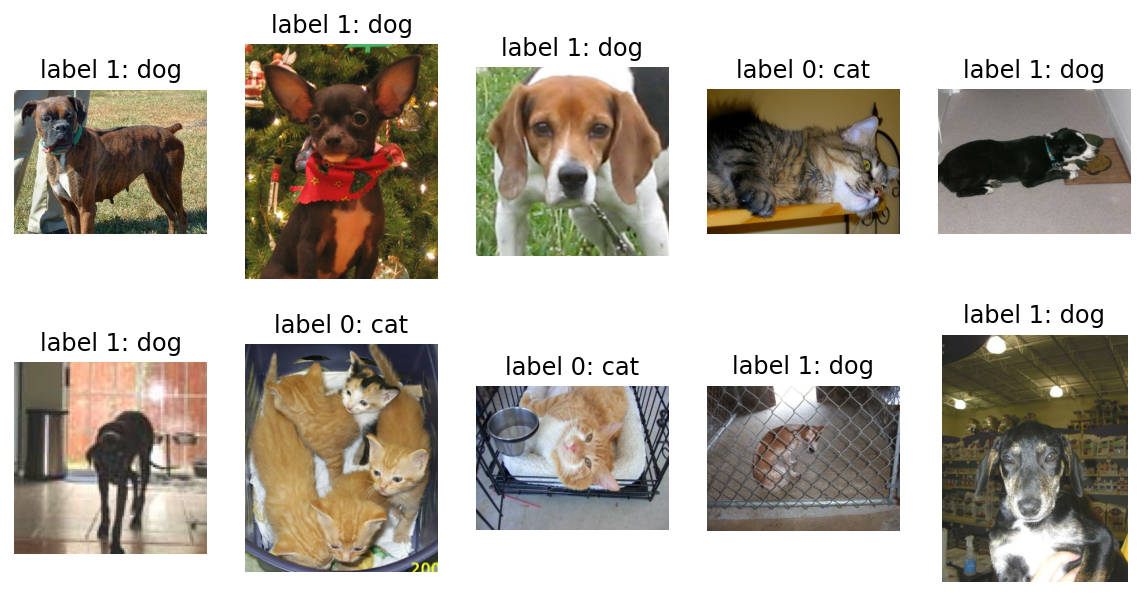
이미지 사이즈 통일 시켜주기 & 각 픽셀값의 scale을 수정
IMG_SIZE = 160 # 리사이징할 이미지의 크기

def format_example(image, label):
    image = tf.cast(image, tf.float32)  # image=float(image)같은 타입캐스팅의  텐서플로우 버전입니다.
    image = (image/127.5) - 1 # 픽셀값의 scale 수정
    image = tf.image.resize(image, (IMG_SIZE, IMG_SIZE))
    return image, label

train = raw_train.map(format_example)
validation = raw_validation.map(format_example)
test = raw_test.map(format_example)

# 이미지 사이즈: 160x160, 픽셀 스케일: -1 ~ 1
plt.figure(figsize=(10, 5))
get_label_name = metadata.features['label'].int2str
for idx, (image, label) in enumerate(train.take(10)):
plt.subplot(2, 5, idx+1)
image = (image + 1) / 2
plt.imshow(image)
plt.title(f'label {label}: {get_label_name(label)}')
plt.axis('off')
# 픽셀 스케일: 0 ~ 1
텐서플로우를 활용해 모델 구조 설계하기
from tensorflow.keras.models import Sequential
from tensorflow.keras.layers import Dense, Conv2D, Flatten, MaxPooling2D

model = Sequential([
    Conv2D(filters=16, kernel_size=3, padding='same', activation='relu', input_shape=(160, 160, 3)),
    MaxPooling2D(),
    Conv2D(filters=32, kernel_size=3, padding='same', activation='relu'),
    MaxPooling2D(),
    Conv2D(filters=64, kernel_size=3, padding='same', activation='relu'),
    MaxPooling2D(),
    Flatten(),
    Dense(units=512, activation='relu'),
    Dense(units=2, activation='softmax')
])

model.summary()
'''
>>>
Model: "sequential"
_________________________________________________________________
Layer (type)                 Output Shape              Param #
=================================================================
conv2d (Conv2D)              (None, 160, 160, 16)      448
_________________________________________________________________
max_pooling2d (MaxPooling2D) (None, 80, 80, 16)        0
_________________________________________________________________
conv2d_1 (Conv2D)            (None, 80, 80, 32)        4640
_________________________________________________________________
max_pooling2d_1 (MaxPooling2 (None, 40, 40, 32)        0
_________________________________________________________________
conv2d_2 (Conv2D)            (None, 40, 40, 64)        18496
_________________________________________________________________
max_pooling2d_2 (MaxPooling2 (None, 20, 20, 64)        0
_________________________________________________________________
flatten (Flatten)            (None, 25600)             0
_________________________________________________________________
dense (Dense)                (None, 512)               13107712
_________________________________________________________________
dense_1 (Dense)              (None, 2)                 1026
=================================================================
Total params: 13,132,322
Trainable params: 13,132,322
Non-trainable params: 0
_________________________________________________________________
'''
LeNet구조

맨 왼쪽처럼 이미지 한 장이 입력되면 그 이미지는 Convolutional(합성곱) 연산을 통해 그 형태가 점점 길쭉해지다가, Flatten 레이어를 만나면 오른쪽처럼 한 줄로 펴진다. 즉 3차원의 이미지를 1차원으로 펼치는 것이다.
모델 complie 완료 후 학습시키기
learning_rate = 0.0001
model.compile(optimizer=tf.keras.optimizers.RMSprop(lr=learning_rate),
              loss=tf.keras.losses.sparse_categorical_crossentropy,
              metrics=['accuracy'])
**
optimizer는 학습을 어떤 방식으로 시킬 것인지 결정합니다. 어떻게 최적화시킬 것인지를 결정하기 때문에 최적화 함수라고 부르기도 합니다.
loss는 모델이 학습해나가야 하는 방향을 결정합니다. 이 문제에서는 모델의 출력은 입력받은 이미지가 고양이인지 강아지인지에 대한 확률분포로 두었으므로, 입력 이미지가 고양이(label=0)일 경우 모델의 출력이 [1.0, 0.0]에 가깝도록, 강아지(label=1)일 경우 [0.0, 1.0]에 가까워지도록 하는 방향을 제시합니다.
metrics는 모델의 성능을 평가하는 척도입니다. 분류 문제를 풀 때, 성능을 평가할 수 있는 지표는 정확도(accuracy), 정밀도(precision), 재현율(recall) 등이 있습니다. 여기서는 정확도를 사용했습니다.**
학습시키기
BATCH_SIZE = 32
SHUFFLE_BUFFER_SIZE = 1000

train_batches = train.shuffle(SHUFFLE_BUFFER_SIZE).batch(BATCH_SIZE)
validation_batches = validation.batch(BATCH_SIZE)
test_batches = test.batch(BATCH_SIZE)

# 학습전 validation set으로 학습해보기
validation_steps = 20
loss0, accuracy0 = model.evaluate(validation_batches, steps=validation_steps)
'''
>>>
initial loss: 0.69
initial accuracy: 0.52
'''

# epoch를 10으로 하여 학습시키기
EPOCHS = 10
history = model.fit(train_batches,
                    epochs=EPOCHS,
                    validation_data=validation_batches)
'''
>>>
loss: 0.0873 - accuracy: 0.9738 - val_loss: 0.6853 - val_accuracy: 0.7764
'''
**첫 번째
accuracy는 훈련 데이터셋에 대한 정확도입니다. 학습하고 있는 데이터에 대한 정확도이죠.
두 번째 val_accuracy는 검증 데이터셋에 대한 정확도입니다. 학습하지 않고 있는, 즉 해당 학습 단계에서 보지 않은 데이터에 대한 정확도이죠.**
학습 단게별 정확도와 손실함수값을 그래프로 확인
acc = history.history['accuracy']
val_acc = history.history['val_accuracy']

loss=history.history['loss']
val_loss=history.history['val_loss']

epochs_range = range(EPOCHS)

plt.figure(figsize=(12, 8))
plt.subplot(1, 2, 1)
plt.plot(epochs_range, acc, label='Training Accuracy')
plt.plot(epochs_range, val_acc, label='Validation Accuracy')
plt.legend()
plt.title('Training and Validation Accuracy')

plt.subplot(1, 2, 2)
plt.plot(epochs_range, loss, label='Training Loss')
plt.plot(epochs_range, val_loss, label='Validation Loss')
plt.legend()
plt.title('Training and Validation Loss')
plt.show()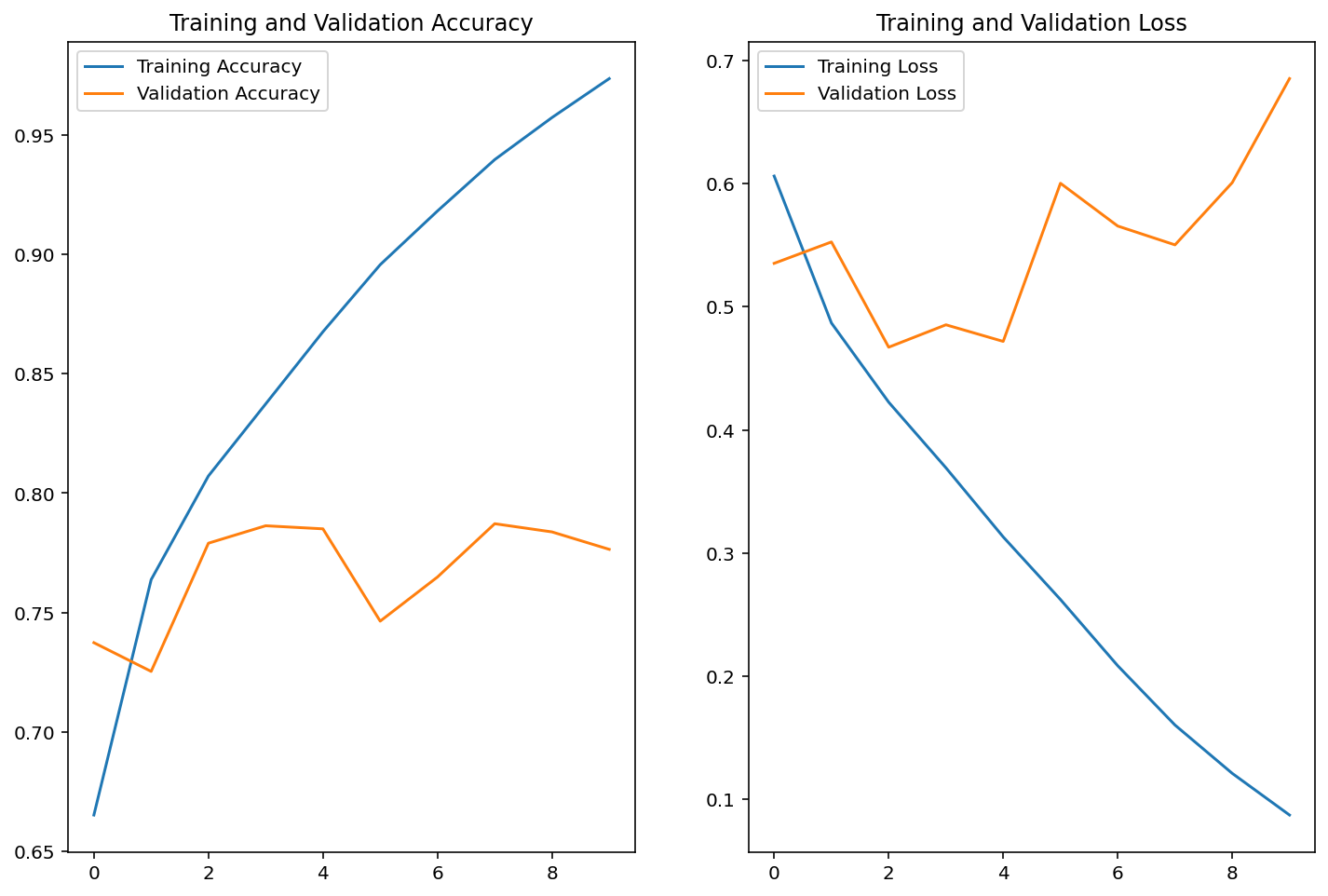
모델의 예측결과 확인
for image_batch, label_batch in test_batches.take(1):
    images = image_batch
    labels = label_batch
    predictions = model.predict(image_batch)
    pass

predictions = np.argmax(predictions, axis=1)

plt.figure(figsize=(20, 12))

for idx, (image, label, prediction) in enumerate(zip(images, labels, predictions)):
    plt.subplot(4, 8, idx+1)
    image = (image + 1) / 2
    plt.imshow(image)
    correct = label == prediction
    title = f'real: {label} / pred :{prediction}\n {correct}!'
    if not correct:
        plt.title(title, fontdict={'color': 'red'})
    else:
        plt.title(title, fontdict={'color': 'blue'})
    plt.axis('off')
count = 0   # 정답을 맞춘 개수
for image, label, prediction in zip(images, labels, predictions):
    # [[YOUR CODE]]
    correct = label == prediction
    if correct:
        count += 1

print(count / 32 * 100)
2. 내가 직접 만들지 않고 가져다 쓰는 강아지 고양이 분류기
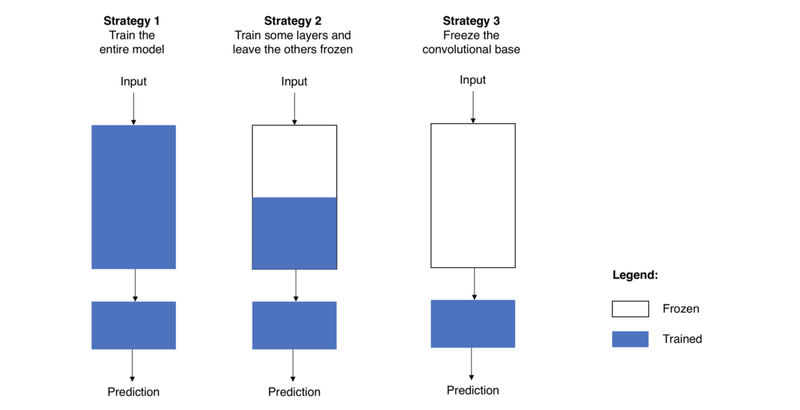
Transfer Learning (전이 학습)
**전략 1은 전체 모델을 새로 학습시키는 것이다. 이 경우에는 사전학습 모델의 구조만 사용한다. 모델을 완전히 새로 학습시켜야하므로, 큰 사이즈의 데이터셋과 좋은 컴퓨팅 연산 능력이 있을 때 적합하다.
전략 2는 Convolutional base의 일부분은 고정시킨 상태로, 나머지 계층과 classifier만 새로 학습시키는 것이다. 데이터셋의 크기에 따라 얼마나 많은 계층을 새로 학습시킬지 달라지는데, 데이터의 양이 많을수록 더 많이 새로 학습시키고, 데이터의 양이 적을수록 학습시키는 부분을 적게 한다.
전략 3은 Convolutional base는 고정시키고, classifier만 새로 학습시키는 것이다. 이 경우는 convolutional base는 건들지 않고 그대로 두면서 특징 추출 메커니즘으로 활용하고, classifier만 재학습시키는 방법이다. 컴퓨팅 연산능력이 부족하거나 데이터셋이 작을 때 고려해볼 수 있다.**
모델 가져오기
IMG_SHAPE = (IMG_SIZE, IMG_SIZE, 3)

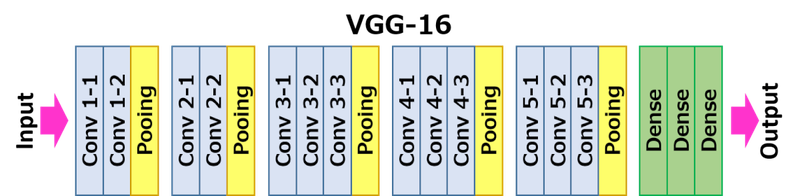
# Create the base model from the pre-trained model VGG16
# output에 가까운 높은 레벨에 있는 3개의 FC 레이어는 제외하고 불러와야 하므로
# include_top=False 옵션을 주었다.
base_model = tf.keras.applications.VGG16(input_shape=IMG_SHAPE,
                                         include_top=False,
                                         weights='imagenet')

base_model.summary()
'''
>>>
Model: "vgg16"
_________________________________________________________________
Layer (type)                 Output Shape              Param #
=================================================================
input_4 (InputLayer)         [(None, 160, 160, 3)]     0
_________________________________________________________________
block1_conv1 (Conv2D)        (None, 160, 160, 64)      1792
_________________________________________________________________
block1_conv2 (Conv2D)        (None, 160, 160, 64)      36928
_________________________________________________________________
block1_pool (MaxPooling2D)   (None, 80, 80, 64)        0
_________________________________________________________________
block2_conv1 (Conv2D)        (None, 80, 80, 128)       73856
_________________________________________________________________
block2_conv2 (Conv2D)        (None, 80, 80, 128)       147584
_________________________________________________________________
block2_pool (MaxPooling2D)   (None, 40, 40, 128)       0
_________________________________________________________________
block3_conv1 (Conv2D)        (None, 40, 40, 256)       295168
_________________________________________________________________
block3_conv2 (Conv2D)        (None, 40, 40, 256)       590080
_________________________________________________________________
block3_conv3 (Conv2D)        (None, 40, 40, 256)       590080
_________________________________________________________________
block3_pool (MaxPooling2D)   (None, 20, 20, 256)       0
_________________________________________________________________
block4_conv1 (Conv2D)        (None, 20, 20, 512)       1180160
_________________________________________________________________
block4_conv2 (Conv2D)        (None, 20, 20, 512)       2359808
_________________________________________________________________
block4_conv3 (Conv2D)        (None, 20, 20, 512)       2359808
_________________________________________________________________
block4_pool (MaxPooling2D)   (None, 10, 10, 512)       0
_________________________________________________________________
block5_conv1 (Conv2D)        (None, 10, 10, 512)       2359808
_________________________________________________________________
block5_conv2 (Conv2D)        (None, 10, 10, 512)       2359808
_________________________________________________________________
block5_conv3 (Conv2D)        (None, 10, 10, 512)       2359808
_________________________________________________________________
block5_pool (MaxPooling2D)   (None, 5, 5, 512)         0
=================================================================
Total params: 14,714,688
Trainable params: 14,714,688
Non-trainable params: 0
_________________________________________________________________
'''
모델의 마지막 출력값 형상확인
feature_batch = base_model(image_batch)
feature_batch.shape
'''
>>>
(32, 5, 5, 512)
'''
마지막 레이어(Dense Layer)는 모든 숫자들이 다음 계층의 모든 숫자와 연결되야 하기 때문에 반드시 1차원이어야 한다.
Flatten과 다른 방법으로 3차원 이미지의 shape바꾸기
Global Average Pooling
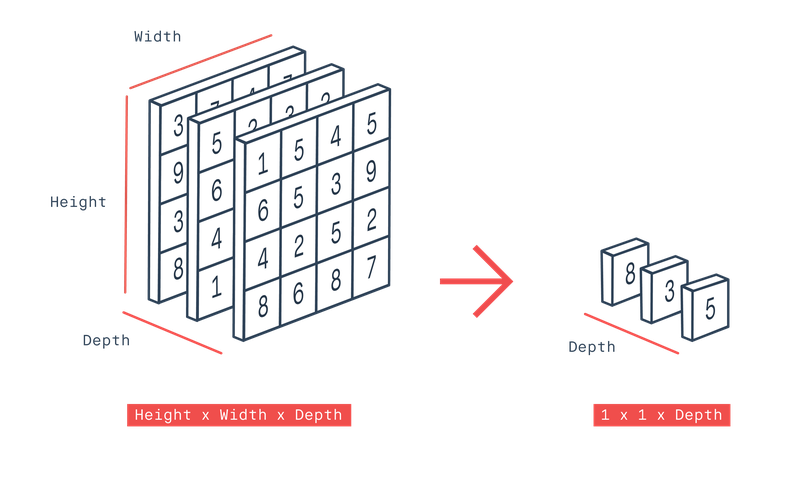
Global Average Pooling 계층 만들기
global_average_layer = tf.keras.layers.GlobalAveragePooling2D()

# 적용
feature_batch_average = global_average_layer(feature_batch)
print(feature_batch_average.shape)
'''
>>>
(32, 512)
'''
모델 합치기
dense_layer = tf.keras.layers.Dense(512, activation='relu')
prediction_layer = tf.keras.layers.Dense(2, activation='softmax')

# feature_batch_averag가 dense_layer를 거친 결과가 다시 prediction_layer를 거치게 되면
prediction_batch = prediction_layer(dense_layer(feature_batch_average))
print(prediction_batch.shape)
최종 모델 만들기
# base_model은 학습 시키지 않을 에정이니 학습여부를 false로 지정
base_model.trainable = False

# 최종 모델
model = tf.keras.Sequential([
  base_model,
  global_average_layer,
  dense_layer,
  prediction_layer
])

model.summary()
'''
>>>
Model: "sequential_1"
_________________________________________________________________
Layer (type)                 Output Shape              Param #
=================================================================
vgg16 (Functional)           (None, 5, 5, 512)         14714688
_________________________________________________________________
global_average_pooling2d (Gl (None, 512)               0
_________________________________________________________________
dense_2 (Dense)              (None, 512)               262656
_________________________________________________________________
dense_3 (Dense)              (None, 2)                 1026
=================================================================
Total params: 14,978,370
Trainable params: 263,682
Non-trainable params: 14,714,688
_________________________________________________________________
'''
모델 학습 시키기
base_learning_rate = 0.0001
model.compile(optimizer=tf.keras.optimizers.RMSprop(lr=base_learning_rate),
              loss=tf.keras.losses.sparse_categorical_crossentropy,
              metrics=['accuracy'])

EPOCHS = 5   # 이번에는 이전보다 훨씬 빠르게 수렴되므로 5Epoch이면 충분합니다.

history = model.fit(train_batches,
                    epochs=EPOCHS,
                    validation_data=validation_batches)

'''
>>>
loss: 0.1346 - accuracy: 0.9446 - val_loss: 0.1395 - val_accuracy: 0.9407
'''
그래프로 확인 하기
acc = history.history['accuracy']
val_acc = history.history['val_accuracy']

loss = history.history['loss']
val_loss = history.history['val_loss']

plt.figure(figsize=(16, 8))
plt.subplot(1, 2, 1)
plt.plot(acc, label='Training Accuracy')
plt.plot(val_acc, label='Validation Accuracy')
plt.legend(loc='lower right')
plt.ylabel('Accuracy')
plt.ylim([min(plt.ylim()),1])
plt.title('Training and Validation Accuracy')

plt.subplot(1, 2, 2)
plt.plot(loss, label='Training Loss')
plt.plot(val_loss, label='Validation Loss')
plt.legend(loc='upper right')
plt.ylabel('Cross Entropy')
plt.ylim([0,1.0])
plt.title('Training and Validation Loss')
plt.xlabel('epoch')
plt.show()
예측 결과 확인
for image_batch, label_batch in test_batches.take(1):
    images = image_batch
    labels = label_batch
    predictions = model.predict(image_batch)
    pass

predictions = np.argmax(predictions, axis=1)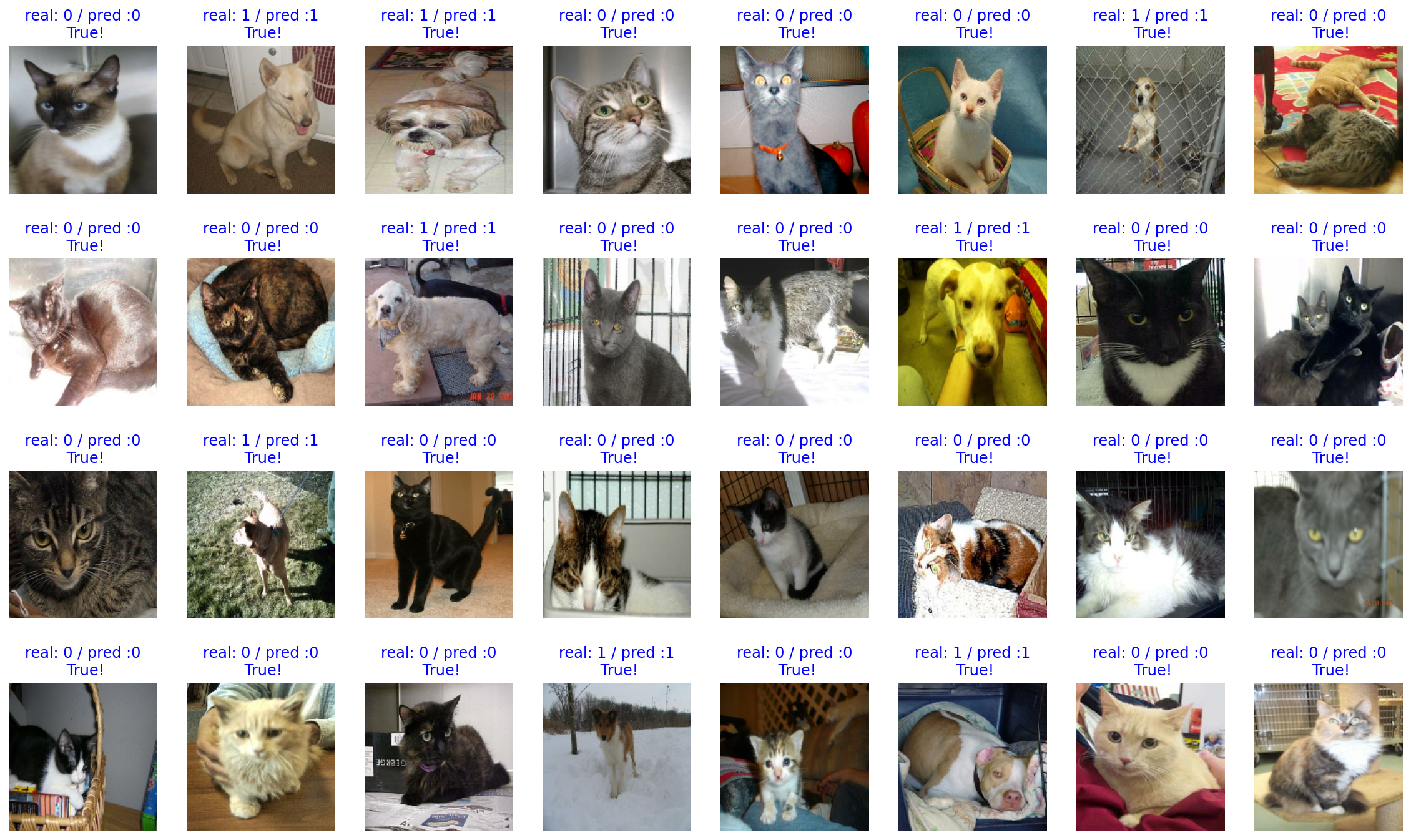
3. 만든 모델을 저장 하기
import os

checkpoint_dir = os.getenv("HOME") + "/aiffel/cat_vs_dog/checkpoint"
checkpoint_file_path = os.path.join(checkpoint_dir, 'checkpoint')

if not os.path.exists('checkpoint_dir'):
    os.mkdir('checkpoint_dir')

model.save_weights(checkpoint_file_path)     # checkpoint 파일 생성

if os.path.exists(checkpoint_file_path):
  print('checkpoint 파일 생성 OK!!')
만든 모델 적용 시키기
# 이미지: my_dog.jpeg, my_cat.jpeg, cat_face.jpeg

# 에측하는 모델 함수화
def show_and_predict_image(dirpath, filename, img_size=160):
    filepath = os.path.join(dirpath, filename)
    image = load_img(filepath, target_size=(img_size, img_size))
    plt.imshow(image)
    plt.axis('off')
    image = img_to_array(image).reshape(1, img_size, img_size, 3)
    prediction = model.predict(image)[0]
    cat_percentage = round(prediction[0] * 100)
    dog_percentage = round(prediction[1] * 100)
    print(f"This image seems {dog_percentage}% dog, and {cat_percentage}% cat.")

# 강아지 사진
filename = 'my_dog.jpeg'
show_and_predict_image(img_dir_path, filename)
'''
>>>
This image seems 100% dog, and 0% cat.
'''

# 고양이 사진
filename = 'my_cat.jpeg'
show_and_predict_image(img_dir_path, filename)
'''
>>>
This image seems 0% dog, and 100% cat.
'''

# 내 사진
filename = 'my_face.jpeg'
show_and_predict_image(img_dir_path, filename)
'''
>>>
This image seems 100% dog, and 0% cat.
''''AIFFEL > fundametal' 카테고리의 다른 글
| Fundamental 16 (0) | 2022.01.17 |
|---|---|
| Fundamental 15 (0) | 2022.01.14 |
| Fundamental 05 (0) | 2022.01.10 |
| Fundamental 13 (0) | 2022.01.10 |
| Fundamental 12 (0) | 2022.01.07 |