
Fundamental 20
비지도학습(Unsupervised learning)이란?
지도학습과 달리 training data 로 정답(label)이 없는 데이터가 주어지는 학습방법이다.
오로지 데이터셋의 특징(feature) 및 패턴을 기반으로 모델 스스로가 판단한다.
비지도학습의 대표적인 에시
- 군집화(clustering) → K-means, DBSCAM
- 차원 축소(demensionality reduction) → PCA(Principal Component Analysis), T-SNE
- 데이터시각화
- 생성모델(generative model)
클러스터링 K-means
군집화(clustering)이란?
명확한 분류 기준(label)이 없는 상황에서도 데이터들을 분석하여 가까운것들끼리 묶어 주는 작업이다.
K-means알고리즘이란?
k값이 주어져 있을 때, 주어진 데이터들을 k개의 클러스터로 묶는 알고리즘으로 대표적인 클러스터링 기법 중 하나이다.
데이터 생성
# 5개의 중심점을 기준으로 무작위 점 데이터 100개 생성
%matplotlib inline
from sklearn.datasets import make_blobs
import pandas as pd
import numpy as np
import matplotlib.pyplot as plt
import random

# 중심점이 5개인 100개의 점 데이터를 무작위로 생성합니다.
points, labels = make_blobs(n_samples=100, centers=5, n_features=2, random_state=135)

print(points.shape, points[:10])  # 무작위로 생성된 점의 좌표 10개 출력
print(labels.shape, labels[:10])    # 10개의 점들이 각각 대응하는 중심점(label) 값 출력
'''
(100, 2) [[ 4.63411914 -6.52590383]
 [-6.52008604  7.16624288]
 [ 2.14142339 -5.21092623]
 [ 1.70054231  8.54077897]
 [-0.33809159  8.76509668]
 [-7.69329744  7.94546313]
 [ 3.89090121 -3.06531839]
 [ 3.22338498 -2.93209009]
 [-6.63962964  5.34777334]
 [ 6.37904965 -6.46617328]]
(100,) [2 1 0 3 3 1 0 0 1 2] # 임의로 지정한 k개의 중심점이 새로운 label 역할을 한다.
'''
# 축 그리기
fig = plt.figure()
ax = fig.add_subplot(1, 1, 1)
# 위에서 생성한 점 데이터들을 pandas DataFrame 형태로 변환하기
points_df = pd.DataFrame(points, columns=['X', 'Y'])
display(points_df.head())
# 점 데이터를 X-Y grid에 시각화하기
ax.scatter(points[:, 0], points[:, 1], c='black', label='random generated data')
# 축 이름을 라벨에 달고, 점 데이터 그리기
ax.set_xlabel('X')
ax.set_ylabel('Y')
ax.legend()
ax.grid()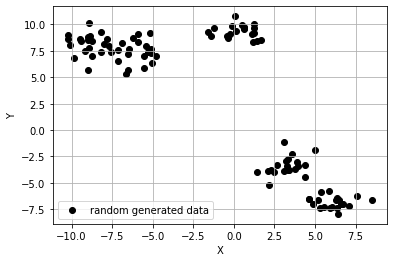
생성한 데이터에 K-means 알고리즘 적용
전체적인 K-means 알고리즘의 순서
- 원하는 클러스터의 수(K)를 결정합니다.
- 무작위로 클러스터의 수와 같은 K개의 중심점(centroid)을 선정합니다. 이들은 각각의 클러스터를 대표합니다.
- 나머지 점들과 모든 중심점 간의 유클리드 거리를 계산한 후, 가장 가까운 거리를 가지는 중심점의 클러스터에 속하도록 합니다.
- 각 K개의 클러스터의 중심점을 재조정합니다. 특정 클러스터에 속하는 모든 점들의 평균값이 해당 클러스터 다음 iteration의 중심점이 됩니다.(이 중심점은 실제로 존재하는 데이터가 아니어도 상관없습니다.)
- 재조정된 중심점을 바탕으로 모든 점들과 새로 조정된 중심점 간의 유클리드 거리를 다시 계산한 후, 가장 가까운 거리를 가지는 클러스터에 해당 점을 재배정합니다.
- 4.번과 5.번을 반복 수행합니다. 반복의 횟수는 사용자가 적절히 조절하면 되고, 특정 iteration 이상이 되면 수렴(중심점이 더 이상 바뀌지 않음)하게 됩니다.
from sklearn.cluster import KMeans

# 1), 2) 위에서 생성한 무작위 점 데이터(points)에 클러스터의 수(K)가 5인 K-means 알고리즘을 적용
kmeans_cluster = KMeans(n_clusters=5)

# 3) ~ 6) 과정이 전부 함축되어 있는 코드입니다. points에 대하여 K가 5일 때의 K-means iteration을 수행
kmeans_cluster.fit(points)

print(type(kmeans_cluster.labels_))
print(np.shape(kmeans_cluster.labels_))
print(np.unique(kmeans_cluster.labels_))
'''
<class 'numpy.ndarray'>
(100,)
[0 1 2 3 4]
'''
시각화
# n 번째 클러스터 데이터를 어떤 색으로 도식할 지 결정하는 color dictionary
color_dict = {0: 'red', 1: 'blue', 2:'green', 3:'brown', 4:'indigo'}

# 점 데이터를 X-Y grid에 시각화합니다.
fig = plt.figure()
ax = fig.add_subplot(1, 1, 1)

# K-means clustering의 결과대로 색깔별로 구분하여 점에 색칠한 후 도식
for cluster in range(5):
    cluster_sub_points = points[kmeans_cluster.labels_ == cluster] # 전체 무작위 점 데이터에서 K-means 알고리즘에 의해 군집화된 sub data를 분리합니다.
    ax.scatter(cluster_sub_points[:, 0], cluster_sub_points[:, 1], c=color_dict[cluster], label='cluster_{}'.format(cluster)) # 해당 sub data를 plot합니다.

# 축 이름을 라벨에 달고, 점 데이터 그리기
ax.set_xlabel('X')
ax.set_ylabel('Y')
ax.legend()
ax.grid()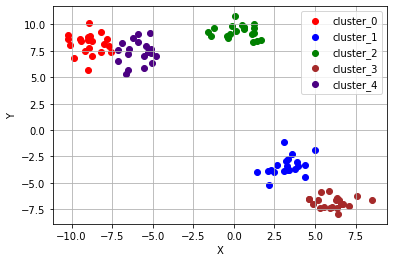
K-means 알고리즘이 잘 동작하지 않는 예시들
# K-means algorithm이 잘 동작하지 않는 예시 (1) 원형 분포
from sklearn.datasets import make_circles

# 원형 분포 데이터 생성
circle_points, circle_labels = make_circles(n_samples=100, factor=0.5, noise=0.01) # 원형 분포를 가지는 점 데이터 100개를 생성합니다.

# 캔버스 생성
fig = plt.figure()
ax = fig.add_subplot(1, 1, 1)

# 원형 분포에 대해 K-means 수행
circle_kmeans = KMeans(n_clusters=2)
circle_kmeans.fit(circle_points)
color_dict = {0: 'red', 1: 'blue'}
for cluster in range(2):
    cluster_sub_points = circle_points[circle_kmeans.labels_ == cluster]
    ax.scatter(cluster_sub_points[:, 0], cluster_sub_points[:, 1], c=color_dict[cluster], label='cluster_{}'.format(cluster))
ax.set_title('K-means on circle data, K=2')
ax.set_xlabel('X')
ax.set_ylabel('Y')
ax.legend()
ax.grid()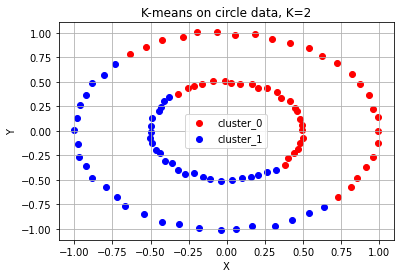
# K-means algorithm이 잘 동작하지 않는 예시 (2) 달 모양 분포
from sklearn.datasets import make_moons

# 달 모양 분포의 데이터 생성
moon_points, moon_labels = make_moons(n_samples=100, noise=0.01) # 달 모양 분포를 가지는 점 데이터 100개를 생성합니다.

# 캔버스 생성
fig = plt.figure()
ax = fig.add_subplot(1, 1, 1)

# 달 모양 분포 데이터 plot
moon_kmeans = KMeans(n_clusters=2)
moon_kmeans.fit(moon_points)
color_dict = {0: 'red', 1: 'blue'}
for cluster in range(2):
    cluster_sub_points = moon_points[moon_kmeans.labels_ == cluster]
    ax.scatter(cluster_sub_points[:, 0], cluster_sub_points[:, 1], c=color_dict[cluster], label='cluster_{}'.format(cluster))
ax.set_title('K-means on moon-shaped data, K=2')
ax.set_xlabel('X')
ax.set_ylabel('Y')
ax.legend()
ax.grid()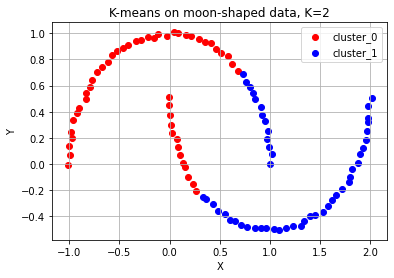
# K-means algorithm이 잘 동작하지 않는 예시 (3) 대각선 모양 분포
from sklearn.datasets import make_circles, make_moons, make_blobs

# 대각선 모양 분포의 데이터 생성
diag_points, _ = make_blobs(n_samples=100, random_state=170) #대각선 분포를 가지는 점 데이터 100개를 생성합니다.(현재는 무작위 분포)
transformation = [[0.6, -0.6], [-0.4, 0.8]] #대각선 변환을 위한 대각 행렬
diag_points = np.dot(diag_points, transformation) #본 과정을 통해 무작위 분포의 점 데이터를 대각선 분포로 변환합니다.

# 캔버스 생성
fig = plt.figure()
ax = fig.add_subplot(1, 1, 1)

# 대각선 모양 분포 데이터 plot
diag_kmeans = KMeans(n_clusters=3)
diag_kmeans.fit(diag_points)
color_dict = {0: 'red', 1: 'blue', 2: 'green'}
for cluster in range(3):
    cluster_sub_points = diag_points[diag_kmeans.labels_ == cluster]
    ax.scatter(cluster_sub_points[:, 0], cluster_sub_points[:, 1], c=color_dict[cluster], label='cluster_{}'.format(cluster))
ax.set_title('K-means on diagonal-shaped data, K=2')
ax.set_xlabel('X')
ax.set_ylabel('Y')
ax.legend()
ax.grid()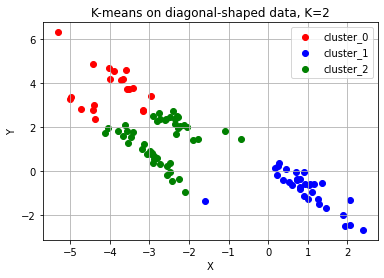
K-means 알고리즘의 단점
- 군집의 개수(K 값)를 미리 지정해야 하기 때문에 이를 알거나 에측하기 어려운 경우에는 사용하기 어렵다.
- 유클리드 거리가 가까운 데이터끼리 군집이 형성되기 때문에 데이터의 분포에 따라 유클리드 거리가 멀면서 밀접하게 연관되어 있는 데이터들의 군집화를 성공적으로 수행하지 못할 수 있다.
클러스터링 DBSCAN
DBSCAN(Density Based Spartial Clustering of Application with Noise)란?
가장 널리 알려짐 밀도(density)기반의 군집 알고리즘이다. K-means 알고리즘을 사용하여 해결하기 어려웠던 문제들을 DBSCAN 알고리즘을 활용해 해결할 수 있다.
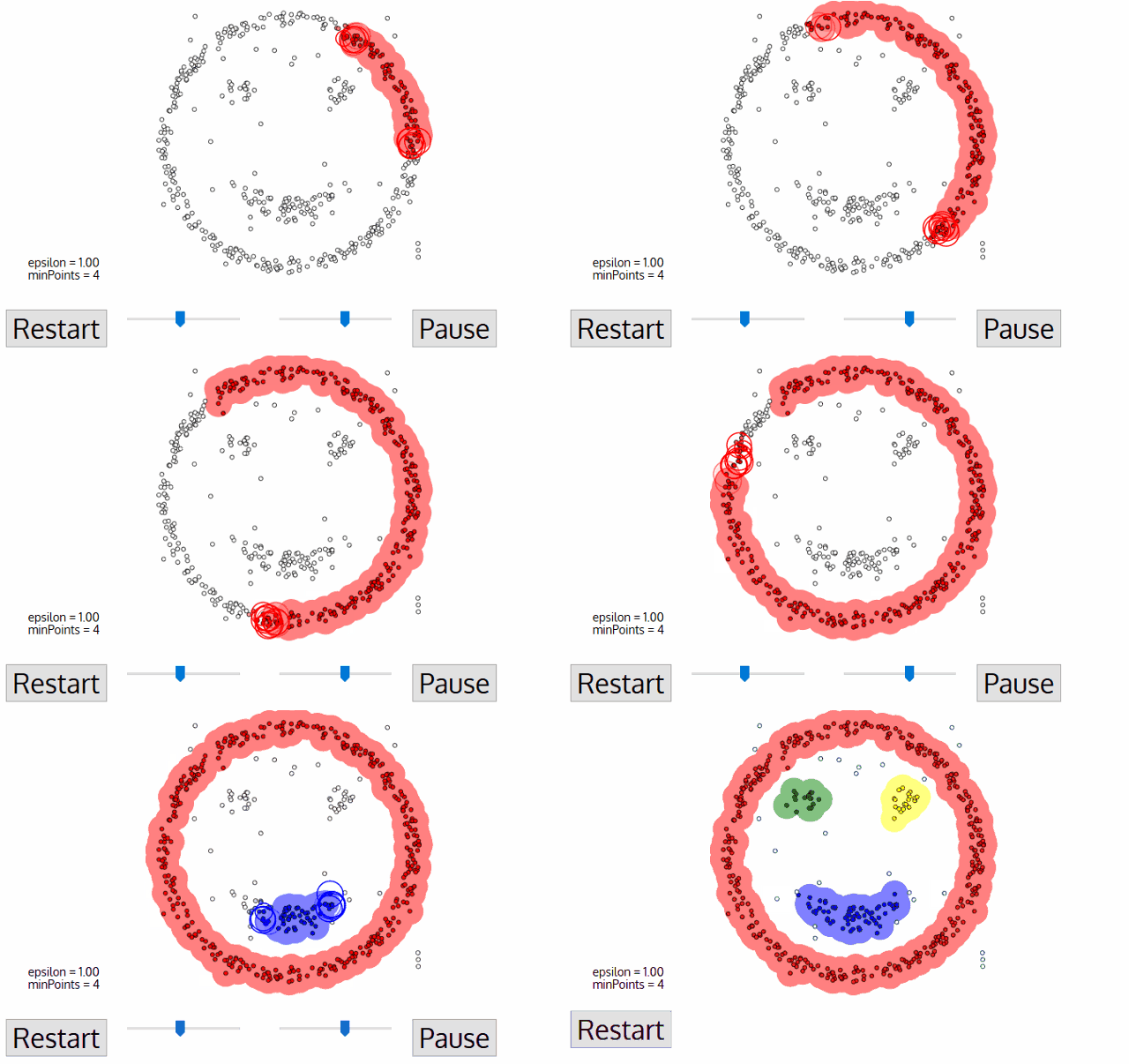
DBSCAN 알고리즘의 동작
변수 및 용어에 대한 설명
- epsilon: 클러스터의 반경
- minPts: 클러스터를 이루는 개체의 최솟값
- core point: 반경 epsilon 내에 minPts 개 이상의 점이 존재하는 중심점
- border point: 군집의 중심이 되지는 못하지만, 군집에 속하는 점
- noise point: 군집에 포함되지 못하는 점
DBSCAN에서는 epsilon과 minPts값을 미리 지정해 주어야 한다.
DBSCAN 알고리즘 동작 순서
- 임의의 점 p를 설정하고, p를 포함하여 주어진 클러스터의 반경(elipson) 안에 포함되어 있는 점들의 개수를 세요.
- 만일 해당 원에 minPts 개 이상의 점이 포함되어 있으면, 해당 점 p를 core point로 간주하고 원에 포함된 점들을 하나의 클러스터로 묶어요.
- 해당 원에 minPts 개 미만의 점이 포함되어 있으면, 일단 pass 합시다.
- 모든 점에 대하여 돌아가면서 1~3 번의 과정을 반복하는데, 만일 새로운 점 p'가 core point가 되고 이 점이 기존의 클러스터(p를 core point로 하는)에 속한다면, 두 개의 클러스터는 연결되어 있다고 하며 하나의 클러스터로 묶어줘요.
- 모든 점에 대하여 클러스터링 과정을 끝냈는데, 어떤 점을 중심으로 하더라도 클러스터에 속하지 못하는 점이 있으면 이를 noise point로 간주해요. 또한, 특정 군집에는 속하지만 core point가 아닌 점들을 border point라고 칭해요.
DBSCAN 알고리즘을 적용해보기
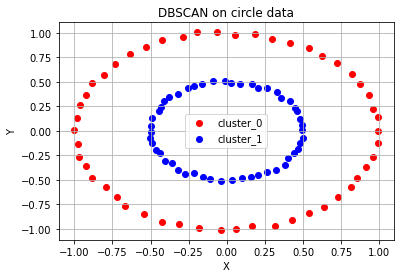
# DBSCAN으로 circle, moon, diagonal shaped data를 군집화한 결과
from sklearn.cluster import DBSCAN

fig = plt.figure()
ax= fig.add_subplot(1, 1, 1)
color_dict = {0: 'red', 1: 'blue', 2: 'green', 3:'brown',4:'purple'} # n 번째 클러스터 데이터를 어떤 색으로 도식할 지 결정하는 color dictionary

# 원형 분포 데이터 plot
epsilon, minPts = 0.2, 3 # 2)와 3) 과정에서 사용할 epsilon, minPts 값을 설정
circle_dbscan = DBSCAN(eps=epsilon, min_samples=minPts) # 위에서 생성한 원형 분포 데이터에 DBSCAN setting
circle_dbscan.fit(circle_points) # 3) ~ 5) 과정을 반복
n_cluster = max(circle_dbscan.labels_)+1 # 3) ~5) 과정의 반복으로 클러스터의 수 도출

print(f'# of cluster: {n_cluster}')
print(f'DBSCAN Y-hat: {circle_dbscan.labels_}')

# DBSCAN 알고리즘의 수행결과로 도출된 클러스터의 수를 기반으로 색깔별로 구분하여 점에 색칠한 후 도식
for cluster in range(n_cluster):
    cluster_sub_points = circle_points[circle_dbscan.labels_ == cluster]
    ax.scatter(cluster_sub_points[:, 0], cluster_sub_points[:, 1], c=color_dict[cluster], label='cluster_{}'.format(cluster))
ax.set_title('DBSCAN on circle data')
ax.set_xlabel('X')
ax.set_ylabel('Y')
ax.legend()
ax.grid()
'''
# of cluster: 2
DBSCAN Y-hat: [0 1 1 0 1 0 0 1 0 0 1 0 1 0 0 1 1 1 0 0 0 1 1 0 0 1 1 0 0 1 0 1 1 1 0 0 0
 0 1 0 0 1 1 0 1 1 1 1 1 0 0 0 1 1 0 0 0 0 0 1 0 1 1 0 1 1 0 0 1 1 0 0 0 0
 0 1 0 1 1 1 1 1 0 1 1 0 1 1 1 1 0 0 0 0 1 1 0 0 1 1]
'''
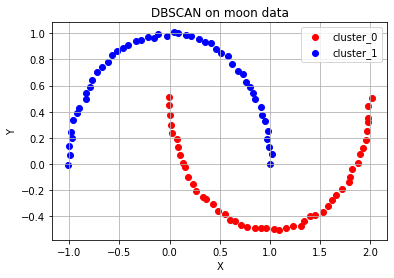
# 달 모양 분포 데이터 plot - 위와 같은 과정 반복
fig = plt.figure()
ax= fig.add_subplot(1, 1, 1)
color_dict = {0: 'red', 1: 'blue', 2: 'green', 3:'brown',4:'purple'} # n 번째 클러스터 데이터를 어떤 색으로 도식할 지 결정하는 color dictionary

epsilon, minPts = 0.4, 3
moon_dbscan = DBSCAN(eps=epsilon, min_samples=minPts)
moon_dbscan.fit(moon_points)
n_cluster = max(moon_dbscan.labels_)+1

print(f'# of cluster: {n_cluster}')
print(f'DBSCAN Y-hat: {moon_dbscan.labels_}')

for cluster in range(n_cluster):
    cluster_sub_points = moon_points[moon_dbscan.labels_ == cluster]
    ax.scatter(cluster_sub_points[:, 0], cluster_sub_points[:, 1], c=color_dict[cluster], label='cluster_{}'.format(cluster))
ax.set_title('DBSCAN on moon data')
ax.set_xlabel('X')
ax.set_ylabel('Y')
ax.legend()
ax.grid()
'''
# of cluster: 2
DBSCAN Y-hat: [0 0 1 1 1 1 0 1 0 0 0 0 0 0 1 1 1 1 1 0 0 0 1 0 0 1 0 0 1 1 1 0 0 1 1 0 1
 1 0 0 0 0 0 0 1 0 0 1 1 1 0 1 1 1 1 1 0 1 0 0 1 0 0 0 1 0 0 1 0 1 0 1 0 1
 1 1 0 1 0 0 1 1 0 1 1 1 1 1 0 0 0 0 1 0 0 1 1 1 0 1]
'''
# 대각선 모양 분포 데이터 plot - 위와 같은 과정 반복
fig = plt.figure()
ax= fig.add_subplot(1, 1, 1)
color_dict = {0: 'red', 1: 'blue', 2: 'green', 3:'brown',4:'purple'} # n 번째 클러스터 데이터를 어떤 색으로 도식할 지 결정하는 color dictionary

epsilon, minPts = 0.7, 3
diag_dbscan = DBSCAN(eps=epsilon, min_samples=minPts)
diag_dbscan.fit(diag_points)
n_cluster = max(diag_dbscan.labels_)+1

print(f'# of cluster: {n_cluster}')
print(f'DBSCAN Y-hat: {diag_dbscan.labels_}')

for cluster in range(n_cluster):
    cluster_sub_points = diag_points[diag_dbscan.labels_ == cluster]
    ax.scatter(cluster_sub_points[:, 0], cluster_sub_points[:, 1], c=color_dict[cluster], label='cluster_{}'.format(cluster))
ax.set_title('DBSCAN on diagonal shaped data')
ax.set_xlabel('X')
ax.set_ylabel('Y')
ax.legend()
ax.grid()
'''
# of cluster: 3
DBSCAN Y-hat: [ 0  1  1  0  0  2  2  0  1  2  2  2  0  2  0  1  2  2  2  1  1  1  1  1
  2  2  0  1  0  2  1  0  2  1  2  0  0  0  0  0  1  0  1  0  0  2  1  1
  0  2  1  1  2  1  0  2 -1  2  0  0  2  0  0  1  0  1  1  2  2  2 -1  0
  2  0  0  0  1  2  2 -1  2  2  1  2  0  0  2  1  1  2  1  1  2  0 -1  1
  0  0  0  1]
'''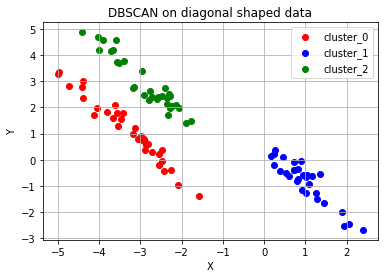
DBSCAN Y-hat 결과가 -1인경우는 어느 군집에도 포함되지 못한 noise point이다.
DBSCAN 알고리즘과 K-means 알고리즘의 소요 시간 비교
# DBSCAN 알고리즘과 K-means 알고리즘의 시간을 비교하는 코드
import time

n_samples= [100, 500, 1000, 2000, 5000, 7500, 10000, 20000, 30000, 40000, 50000]

kmeans_time = []
dbscan_time = []
x = []
for n_sample in n_samples:
    dummy_circle, dummy_labels = make_circles(n_samples=n_sample, factor=0.5, noise=0.01) # 원형의 분포를 가지는 데이터 생성

    # K-means 시간을 측정
    kmeans_start = time.time()
    circle_kmeans = KMeans(n_clusters=2)
    circle_kmeans.fit(dummy_circle)
    kmeans_end = time.time()

    # DBSCAN 시간을 측정
    dbscan_start = time.time()
    epsilon, minPts = 0.2, 3
    circle_dbscan = DBSCAN(eps=epsilon, min_samples=minPts)
    circle_dbscan.fit(dummy_circle)
    dbscan_end = time.time()

    x.append(n_sample)
    kmeans_time.append(kmeans_end-kmeans_start)
    dbscan_time.append(dbscan_end-dbscan_start)
    print("# of samples: {} / Elapsed time of K-means: {:.5f}s / DBSCAN: {:.5f}s".format(n_sample, kmeans_end-kmeans_start, dbscan_end-dbscan_start))

# K-means와 DBSCAN의 소요 시간 그래프화
fig = plt.figure()
ax = fig.add_subplot(1, 1, 1)
ax.scatter(x, kmeans_time, c='red', marker='x', label='K-means elapsed time')
ax.scatter(x, dbscan_time, c='green', label='DBSCAN elapsed time')
ax.set_xlabel('# of samples')
ax.set_ylabel('time(s)')
ax.legend()
ax.grid()
'''
# of samples: 100 / Elapsed time of K-means: 0.02745s / DBSCAN: 0.00115s
# of samples: 500 / Elapsed time of K-means: 0.01932s / DBSCAN: 0.00275s
# of samples: 1000 / Elapsed time of K-means: 0.01705s / DBSCAN: 0.00585s
# of samples: 2000 / Elapsed time of K-means: 0.02123s / DBSCAN: 0.01465s
# of samples: 5000 / Elapsed time of K-means: 1.11609s / DBSCAN: 0.07317s
# of samples: 7500 / Elapsed time of K-means: 1.07758s / DBSCAN: 0.08270s
# of samples: 10000 / Elapsed time of K-means: 1.02104s / DBSCAN: 0.15488s
# of samples: 20000 / Elapsed time of K-means: 0.91613s / DBSCAN: 0.43779s
# of samples: 30000 / Elapsed time of K-means: 1.16300s / DBSCAN: 0.93884s
# of samples: 40000 / Elapsed time of K-means: 1.15252s / DBSCAN: 1.61619s
# of samples: 50000 / Elapsed time of K-means: 1.18206s / DBSCAN: 2.08766s
'''
데이터의 수가 적을 때는 K-meas알고리즘의 수행 시간이 DBSCAN에 비해 더 길었으나, 군집화할 데이터의 수가 많아질수록 DBSCAN의 알고리즘 수행 시간이 급격하게 늘어난다.
차원 축소 PCA
비지도 학습에서 차원 축소를 사용하는 이유
- 요즘에는 정보의 바다라고 부르는 인터넷에 불필요한 정보들을 너무 많이 제공해서 내가 원하는 정보와 원치 않는 정보를 분류하기 힘들다. 차원 축소는 이러한 수많은 정보 속에서 우리에게 더 중요한 요소가 무엇인지를 알게 해주는 방법이다.
PCA란?
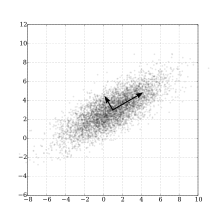
데이터 분포의 주성분을 찾아주는 방법이다. 여기서 주성분이라는 의미는 데이터의 분산이 가장 큰 방향벡터이다. PCA는 데이터들의 분산을 최대로 보존하면서 서로 직교하는 기저(basis)들을 찾아 고차원 공간을 저차원 공간으로 사영한다. 또한 PCA에서는 기존 feature 중 중요한 것을 선택하는 방식이 아닌 기존의 feature를 선형 결합하는 방식을 사용한다.
기저(basis)
- 새로운 좌표계 역할을 할 수 있는 벡터의 모음
- ex. 우리가 사용하는 좌표값이란, 실은 기저의 선형결합으로 표현된것이다. (1,1)이란 x방향 1, y방향 1의 선형결합이다.
위 그림과 같이 타원형 분포로 되어있는 데이터들이 있을 때, 차원의 수는 줄이면서 데이터 분포의 분산을 최대한 유지라기 위해 가장 분산이 긴 축을 첫 기저로 잡고, 그 기저에 직교한느 축 중 가장 분산이 큰 값을 다음 기저로 잡게 된다. 이 과정을 반복하게 되면 차원의 수를 최대로 줄이면서 데이터 분포의 분산을 그대로 유지할 수 있다.

사영(projection)
- x-y-z 좌표상에 존재하는 데이터를 x-y, y-z좌표축에 사영했다는 것은 각각 z,x좌표축을 무시했다는 것이다. 그러면 무시한 데이터만큼의 정보손실이 일어난다.
- PCA는 차원 축소를 시도라되, 주어진 좌표축 방향이 아니라, 가장 분산이 길게 나오는 기저방향을 찾아서 그 방향의 기저만 남기고, 덜 중요한 기저 방향을 삭제하는 방식으로 진행된다. 이렇게 찾은 가장 중요한 기저를 주성분(Principal Component) 방향, 또는 pc축이라고 한다.
데이터 개요
# 차원 축소 예제: 유방암 데이터셋
from sklearn.datasets import load_breast_cancer
from sklearn.model_selection import train_test_split

# 데이터 로드
cancer=load_breast_cancer()

# y=0(Malignant:악성 종양), y=1(Benign:양성 종양)
cancer_X, cancer_y= cancer.data, cancer['target']
train_X, test_X, train_y, test_y = train_test_split(cancer_X, cancer_y, test_size=0.1, random_state=10) # train 데이터셋과 test 데이터셋으로 나눔
print("전체 검사자 수: {}".format(len(cancer_X)))
print("Train dataset에 사용되는 검사자 수: {}".format(len(train_X)))
print("Test dataset에 사용되는 검사자 수: {}".format(len(test_X)))
cancer_df = pd.DataFrame(cancer_X, columns=cancer['feature_names'])
cancer_df.head()
'''
전체 검사자 수: 569
Train dataset에 사용되는 검사자 수: 512
Test dataset에 사용되는 검사자 수: 57
'''
유방암 데이터셋에 PCA 알고리즘 적용
from sklearn.preprocessing import StandardScaler
from sklearn.decomposition import PCA
from sklearn import svm
from sklearn.metrics import accuracy_score
from collections import Counter

# color dictionary
color_dict = {0: 'red', 1: 'blue', 2:'red', 3:'blue'}
target_dict = {0: 'malignant_train', 1: 'benign_train', 2: 'malignant_test', 3:'benign_test'}

#Train data에 PCA 알고리즘 적용
train_X_ = StandardScaler().fit_transform(train_X) # 불러온 데이터에 대한 정규화 -> 각 column의 range of value가 전부 다르기 때문에 정규화를 진행해 주어야 합니다.
train_df = pd.DataFrame(train_X_, columns=cancer['feature_names'])
pca = PCA(n_components=2) # 주성분의 수를 2개, 즉 기저가 되는 방향벡터를 2개로 하는 PCA 알고리즘 수행
pc = pca.fit_transform(train_df)

#Test data에 PCA 알고리즘 적용
test_X_ = StandardScaler().fit_transform(test_X) # normalization
test_df = pd.DataFrame(test_X_, columns=cancer['feature_names'])
pca_test = PCA(n_components=2)
pc_test = pca_test.fit_transform(test_df)

# 훈련한 classifier의 decision boundary를 그리는 함수
def plot_decision_boundary(X, clf, ax):
    h = .02  # step size in the mesh
    # create a mesh to plot in
    x_min, x_max = X[:, 0].min() - 1, X[:, 0].max() + 1
    y_min, y_max = X[:, 1].min() - 1, X[:, 1].max() + 1
    xx, yy = np.meshgrid(np.arange(x_min, x_max, h), np.arange(y_min, y_max, h))
    Z = clf.predict(np.c_[xx.ravel(), yy.ravel()])
    Z = Z.reshape(xx.shape)
    ax.contour(xx, yy, Z, cmap='Blues')

# PCA를 적용한 train data의 classifier 훈련: classfier로 Support Vector Machine(SVM) 사용
clf = svm.SVC(kernel = 'rbf', gamma=0.5, C=0.8) # 여기서는 classifier로 SVM을 사용한다는 정도만 알아둡시다!
clf.fit(pc, train_y) # train data로 classifier 훈련

# PCA를 적용하지 않은 original data의 SVM 훈련
clf_orig = svm.SVC(kernel = 'rbf', gamma=0.5, C=0.8) # 여기서는 classifier로 SVM을 사용한다는 정도만 알아둡시다!
clf_orig.fit(train_df, train_y)
# 캔버스 도식
fig = plt.figure()
ax = fig.add_subplot(1, 1, 1)
# malignant와 benign의 SVM decision boundary 그리기
plot_decision_boundary(pc, clf, ax)
#Train data 도식
for cluster in range(2):
sub_cancer_points = pc[train_y == cluster]
ax.scatter(sub_cancer_points[:, 0], sub_cancer_points[:, 1], edgecolor=color_dict[cluster], c='none', label=target_dict[cluster])
#Test data 도식
for cluster in range(2):
sub_cancer_points = pc_test[test_y == cluster]
ax.scatter(sub_cancer_points[:, 0], sub_cancer_points[:, 1], marker= 'x', c=color_dict[cluster+2], label=target_dict[cluster+2])
ax.set_xlabel('PC1')
ax.set_ylabel('PC2')
ax.set_title('PCA-Breast cancer dataset')
ax.legend()
ax.grid()
# Scoring
pca_test_accuracy_dict = Counter(clf.predict(pc_test) == test_y)
orig_test_accuracy_dict = Counter(clf_orig.predict(test_df) == test_y)
print("PCA 분석을 사용한 Test dataset accuracy: {}명/{}명 => {:.3f}".format(pca_test_accuracy_dict[True], sum(pca_test_accuracy_dict.values()), clf.score(pc_test, test_y)))
print("PCA를 적용하지 않은 Test dataset accuracy: {}명/{}명 => {:.3f}".format(orig_test_accuracy_dict[True], sum(orig_test_accuracy_dict.values()), clf_orig.score(test_df, test_y)))2개의 feature를 사용한 PCA가 30개의 feature를 사용한 방법보다 더 좋은 성능을 냈다. 이것은 3-개의 feature중 종양의 악성/양성과 관련 없는 것이 존재해서 해당 feature가 오히려 분류를 방해했기 때문이다. PCA는 각 feature 간 상관관계가 있고 이를 추릴 필요가 있을 때 유용하세 사용되는 비지도학습 방법이다.
내가 이해한 내용
- PCA를 통해 feature중 가장 상관관계가 높은 feature를 골라 그것을 기저로 잡고 비선형 변환을 한다.
- 비선형 변환을 통해 더욱 쉽게 군집화를 할 수 있고 이것은 지도학습의 효율성을 높여준다.
차원 축소 T-SNE
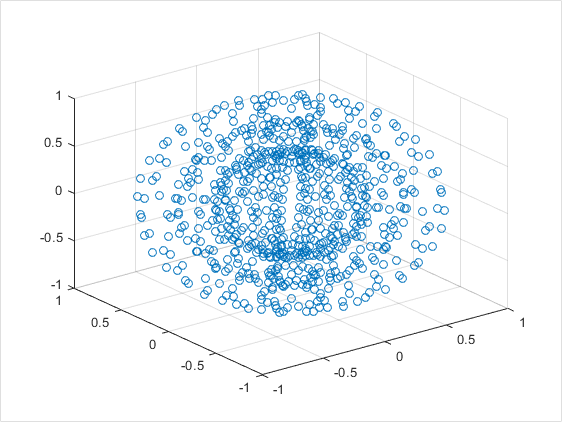
PCA는 주로 선형적인 데이터의 분포를 가지고 있을 때, 정보가 가장 잘 보존된다. 하지만 위의 이미지처럼 방사형적, 비선형적 데이터에서는 많은 정보량을 담기 위한 주성분으로 잡을 선형적인 축을 찾기 어렵다.
T-SNE(T-Stochastic Neighber Embedding)이란?
T-SNE는 시각화에 많이 쓰이는 알고리즘이다. T-SNE는 기존 차원의 공간에서 가까운 점들은, 차원축소된 공간에서도 여전히 가깝게 유지되는 것을 목표로 한다.
즉, PCA는 데이터가 가진 고유한 물리적 정보량을 보존하는데 주력하지만, T-SNA는 고유한 물리적 정보량보다는 데이터들간의 상대적 거리를 보존하는데 주력한다.
사이킷런에서 MNIST 데이터 불러오기
from sklearn.datasets import fetch_openml

# 784 pixel로 이뤄진 mnist 이미지 데이터 호출
mnist = fetch_openml("mnist_784",version=1)

X = mnist.data / 255.0
y = mnist.target
print("X shape: ",X.shape)
print("Y shape: ",y.shape)
'''
X shape:  (70000, 784)
Y shape:  (70000,)
'''

n_image = X.shape[0]
n_image_pixel = X.shape[1]

pixel_columns = [ f"pixel{i}" for i in range(1, n_image_pixel + 1) ] #  픽셀정보가 있는 칼럼의 이름을 담은 목록
len(pixel_columns)
'''
784
'''
# pandas로 데이터프레임 만들기
import pandas as pd
df = pd.DataFrame(X,columns=pixel_columns)
df['y'] = y
df['label'] = df['y'].apply(lambda i: str(i)) # 숫자 라벨을 스트링으로 만드는 함수를 파이썬 람다 문법으로 전체 데이터에 적용합니다.
X, y = None, None# 7만개의 이미지 데이터 중 1만개를 랜덤샘플링
import numpy as np
# 결과가 재생산 가능하도록 랜덤 시드를 지정합니다.
np.random.seed(30)
# 이미지 데이터의 순서를 랜덤으로 뒤바꾼(permutation) 배열을 담습니다.
rndperm = np.random.permutation(n_image)
# 랜덤으로 섞은 이미지 중 10,000개를 뽑고, df_subset에 담습니다.
n_image_sample = 10000
random_idx = rndperm[:n_image_sample]
df_subset = df.loc[rndperm[:n_image_sample],:].copy()
df_subset.shape
'''
(10000, 786)
''' %matplotlib inline
import seaborn as sns
import matplotlib.pyplot as plt
plt.gray()
fig = plt.figure( figsize=(10,6) )
n_img_sample = 15
width,height = 28,28
# 15개 샘플을 시각화해 봅니다.
for i in range(0,n_img_sample):
row = df_subset.iloc[i]
ax = fig.add_subplot(3,5,i+1, title=f"Digit: {row['label']}")
ax.matshow(row[pixel_columns]
.values.reshape((width,height))
.astype(float))
plt.show()
PCA를 이용한 MNIST 차원축소
from sklearn.decomposition import PCA

print("df_subset의 shape: {}".format(df_subset.shape))

n_dimension = 2 # 축소시킬 목표 차원의 수
pca = PCA(n_components=n_dimension)

pca_result = pca.fit_transform(df_subset[pixel_columns].values) # 차원을 축소한 결과
df_subset['pca-one'] = pca_result[:,0] # 축소한 결과의 첫 번째 차원 값
df_subset['pca-two'] = pca_result[:,1] # 축소한 결과의 두 번째 차원 값

print("pca_result의 shape: {}".format(pca_result.shape))
'''
df_subset의 shape: (10000, 786)
pca_result의 shape: (10000, 2)
'''
Principal Component 별로 보존하는 정보량을 확인
- 차원을 축소한 댓가로 차원의 정보량 중 일부만 남게 된다.
- sklearn의 PCA모듈은 pc축마다 보존하는 정보량의 비율을 제시해 준다.
print(f"pca-1: {round(pca.explained_variance_ratio_[0],3)*100}%")
print(f"pca-2: {round(pca.explained_variance_ratio_[1],3)*100}%")
'''
pca-1: 9.6%
pca-2: 7.3%
'''
plt.figure(figsize=(10,6))
sns.scatterplot(
x="pca-one", y="pca-two",
hue="y",
palette=sns.color_palette("hls", 10),
data=df_subset, # 2개의 PC축만 남은 데이터프레임 df_subset 을 시각화해 보자.
legend="full",
alpha=0.4
)
- PCA로 784차원을 2차원으로 줄인 결과 벡터를 Scatter 그래프로 그려보았습니다
- 같거나 모양이 비슷한 숫자 이미지가 유사한 벡터값을 갖는것을 색상으로 확인할 수 있습니다.
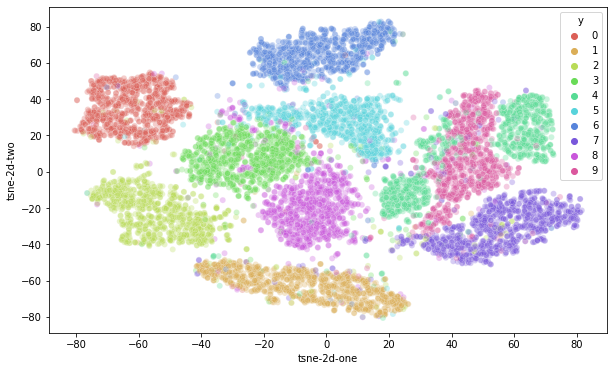
T-SNE를 이용한 MNIST 차원축소
from sklearn.manifold import TSNE

print("df_subset의 shape: {}".format(df_subset.shape))

data_subset = df_subset[pixel_columns].values
n_dimension = 2
tsne = TSNE(n_components=n_dimension)
tsne_results = tsne.fit_transform(data_subset)

print("tsne_results의 shape: {}".format(tsne_results.shape))
'''
df_subset의 shape: (10000, 788)
tsne_results의 shape: (10000, 2)
'''
# tsne 결과를 차원별로 추가합니다.
df_subset['tsne-2d-one'] = tsne_results[:,0]
df_subset['tsne-2d-two'] = tsne_results[:,1]
# 시각화해 봅니다.
plt.figure(figsize=(10,6))
sns.scatterplot(
x="tsne-2d-one", y="tsne-2d-two",
hue="y",
palette=sns.color_palette("hls", 10),
data=df_subset,
legend="full",
alpha=0.3
)
그러면 T-SNE는 PCA보다 우월한 차원축소 기법일까?
→ 그렇지 않습니다.
T-SNE의 두 차원은 물리적 의미를 가지지 않습니다. PCA는 정보 손실을 최소화하려는 관점을 가지고 있으므로, 그 결과 추출된 PC축은 주성분이라는 물리적 의미를 유지하고 있으며, 공분산을 통해 원본 데이터를 일정 부분 복원할 수 있는 가능성을 가지고 있습니다. 그러나 T-SNE는 정보 손실량에 주목하지 않으며, 그 결과 저차원 축이 아무런 물리적 의미를 가지지 못합니다. 오직 시각화에만 유리할 뿐입니다.
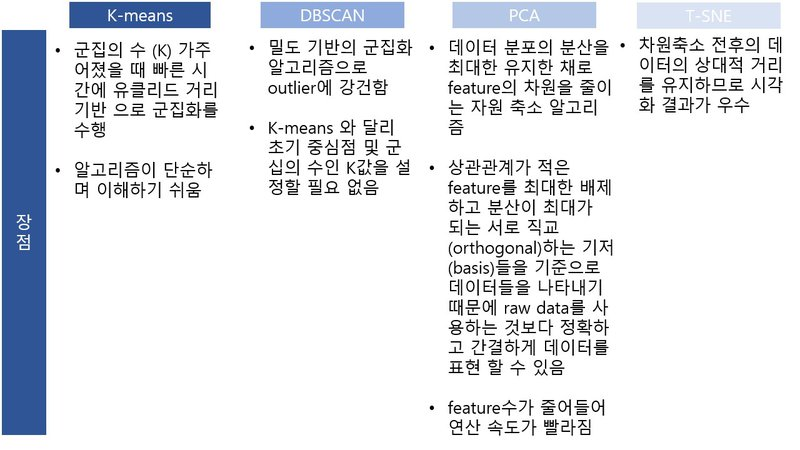
정리 및 요약

'AIFFEL > fundametal' 카테고리의 다른 글
| Fundamental 22 (0) | 2022.02.04 |
|---|---|
| Fundamental 21 (0) | 2022.01.28 |
| Fundamental 19 (0) | 2022.01.24 |
| Fundamental 18 (0) | 2022.01.21 |
| Fundamental 17 (0) | 2022.01.19 |