
Exploration 12
Exploration 12 트랜스포머로 만드는 대화형 챗봇
트랜스포머와 인코더 디코더
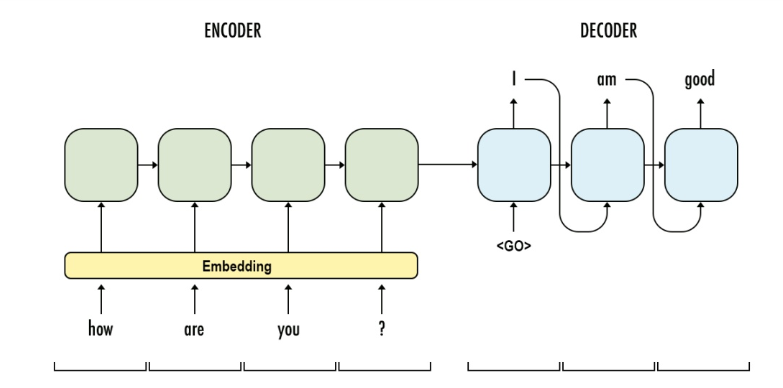
- 인코더: 입력문장
- 디코더: 이에 상응하는 출력문장을 생성
- 이를 훈련한다는 것은 결국 입력 문장과 출력문장두 가지 병렬 구조로 구성된 데이터셋을 훈련한다는 의미이다.
트랜스포머의 인코더와 디코더
트랜스포머는 기본적으로 인코더와 디코더 구성을 가지고 있다.

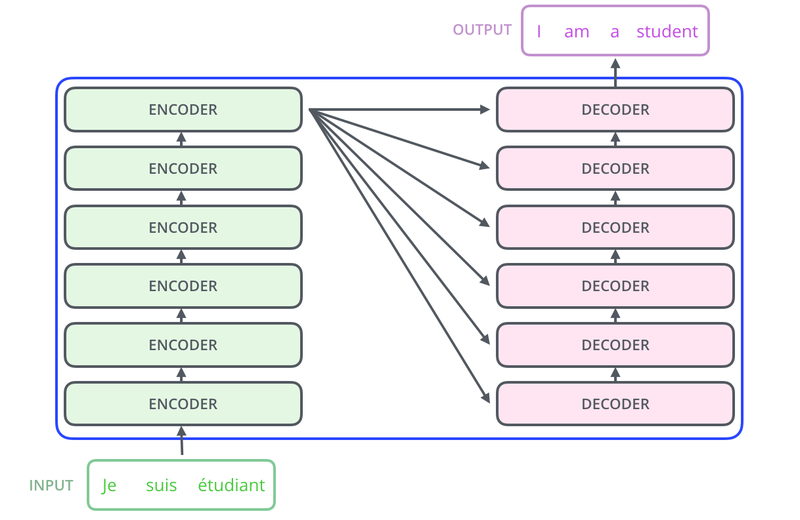
- 초록색 도형: 인코더 층, 입력문장의 정보를 뽑아냄
- 분홍색 도형: 디코더 층, 출력문장의 단어를 하나씩 만들어가는 구조
트랜스포머의 입력 이해하기
import tensorflow as tf
import tensorflow_datasets as tfds
import os
import re
import numpy as np
import matplotlib.pyplot as plt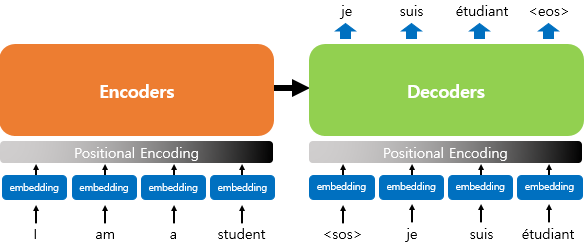
많은 자연어 처리 모델들은 텍스트 문장을 입력으로 받디 위해 단어를 임베딩 벡터로 변환하는 벡터화과정을 거친다. 트랜스포머 또한 벡터화과정을 거친다. 한 가지 다른점은 임베딩 벡터에 어떤 값을 더해준뒤 입력으로 사용한다는 점이다.
포지셔널 인코딩 (positional Encoding)

positional encoding을 하는 이유: 트랜스포머는 입력을 받을 때, 문장에 있는 단어들을 1개씩 순차적으로 받는 것이 아니라, 문장에 있는 모든 단어를 한꺼번에 입력으로 받기 때문이다.
즉, 어순정보를 알여 줄 필요가 있다.
따라서 어순정보를 알려주기 위해 단어의 임베딩 벡터에다가 위치 정보를 가진 벡터 (Positional Encoding)값을 더해서 모델의 입력으로 사용하는 것이다.
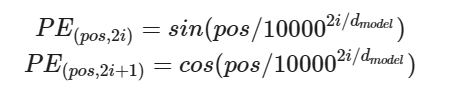
- 트랜스포머는 사인 함수와 코사인 함수의 값을 임베딩 벡터에 더해줌으로써 단어의 순서 정보를 더해준다.

- 임베딩 벡터와 포지셔널 인코딩의 덧셈은 임베딩 벡터가 모여 만들어진 문장 벡터 행렬과 포지셔널 인코딩 행렬의 덧셈 연산을 통해 이루어진다.
용어
- $d_{model}$: 임베딩 벡터의 차원
- $pos$: 입력 문장에서의 임베딩 벡터의 위치
- $i$: 임베딩 벡터 내의 차원의 인덱스
포지셔널 벡터 코드
# 포지셔널 인코딩 레이어
class PositionalEncoding(tf.keras.layers.Layer):

  def __init__(self, position, d_model):
    super(PositionalEncoding, self).__init__()
    self.pos_encoding = self.positional_encoding(position, d_model)

  def get_angles(self, position, i, d_model):
    angles = 1 / tf.pow(10000, (2 * (i // 2)) / tf.cast(d_model, tf.float32))
    return position * angles

  def positional_encoding(self, position, d_model):
    # 각도 배열 생성
    angle_rads = self.get_angles(
        position=tf.range(position, dtype=tf.float32)[:, tf.newaxis],
        i=tf.range(d_model, dtype=tf.float32)[tf.newaxis, :],
        d_model=d_model)

    # 배열의 짝수 인덱스에는 sin 함수 적용
    sines = tf.math.sin(angle_rads[:, 0::2])
    # 배열의 홀수 인덱스에는 cosine 함수 적용
    cosines = tf.math.cos(angle_rads[:, 1::2])

    # sin과 cosine이 교차되도록 재배열
    pos_encoding = tf.stack([sines, cosines], axis=0)
    pos_encoding = tf.transpose(pos_encoding,[1, 2, 0])
    pos_encoding = tf.reshape(pos_encoding, [position, d_model])

    pos_encoding = pos_encoding[tf.newaxis, ...]
    return tf.cast(pos_encoding, tf.float32)

  def call(self, inputs):
    return inputs + self.pos_encoding[:, :tf.shape(inputs)[1], :]
ex)
- 행의 크기(최대 문장의 길이): 50
- 열의 크기(워드 임베딩 차원): 512
sample_pos_encoding = PositionalEncoding(50, 512)

plt.pcolormesh(sample_pos_encoding.pos_encoding.numpy()[0], cmap='RdBu')
plt.xlabel('Depth')
plt.xlim((0, 512))
plt.ylabel('Position')
plt.colorbar()
plt.show()
실제 논문에서 제시된 포지셔널 인코딩

어텐션
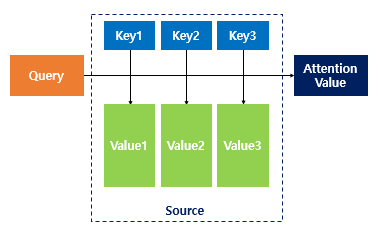
어텐션 함수란?
주어진 쿼리(Query)에 대해서 모든 키(key)와의 유사도를 각각 구하는 함수, 또한 구해낸 이 유사도를 키(key)와 맵핑되어있는 각각의 값(value)에 반영해준다.
트랜스포머에서 사용된 어텐션

트랜스포머는 총 3가지의 어텐션을 사용한다.
- 인코더 셀프 어텐션: 인코더의 입력으로 들어간 문장 내 단어들이 서로 유사도를 구한다.
- 디코더 셀프 어텐션: 단어를 1개씩 생성하는 디코더가 이미 생성된 앞 단어들과의 유사도를 구한다.
- 인코더-디코더 어텐션: 디코더가 잘 예측하기 위해서 인코더에 입력된 단어들과 유사도를 구한다.

- 트랜스포머의 어텐션 함수에 사용되는 쿼리, 키, 값은 기본적으로 단어 벡터이다.
셀프 어텐션 (self Attention)
셀프 어텐션이란?
유사도를 구하는 대상이 다른 문장의 단어가 아니라 현재 문장 내의 단어들이 서로 유사도를 구하는 경우
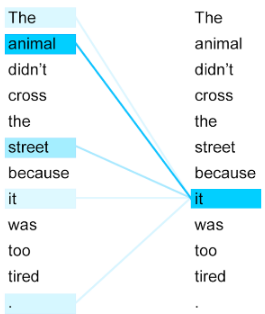
- 여기서 it은 animal과 street 중 어느 것을 의미하는지는 사람은 쉽게 알 수 있다. 하지만 기계는 그렇지않다.
- 따라서 단어들끼리의 유사도를 구하여 it이 animal과 연관되었을 확율이 높다는 것을 찾아낸다.
스케일드 닷 프로덕트 어텐션
트랜스포머는 어텐션 값을 구하는 방법으로 아래와 같은 수식을 사용한다.

- 여기서 Q, K, V는 각각 Query, Key, Value를 의미한다.
- Q, K, V는 단어 벡터를 행으로 하는 문장 행렬이다.
- 벡터의 내적(dot product)은 벡터의 유사도를 의미한다.
- 특정 값을 분모로 사용하는 것은 값의 크기를 조절한는 스케일링(Scaling)을 위함이다.

- Q와 K를 곱하면 위의 그림과 같은 초록색 행렬을 얻을 수 있다.
- am행 student열의 값은 Q행렬의 am벡터와 K행렬의 student의 내적값을 의미한다.
- 따라서 각 단어 벡터의 유사도가 모두 기록된 유사도 행렬이다.
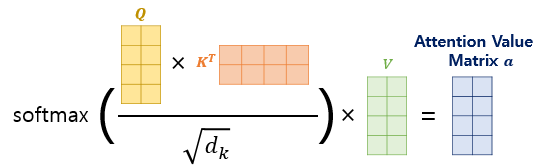
- 여기에 문장 행렬 V를 곲하면 어텐션 값(Attention Value)를 얻는다.
Scales dot product attention
# 스케일드 닷 프로덕트 어텐션 함수
def scaled_dot_product_attention(query, key, value, mask):
  # 어텐션 가중치는 Q와 K의 닷 프로덕트
  matmul_qk = tf.matmul(query, key, transpose_b=True)

  # 가중치를 정규화
  depth = tf.cast(tf.shape(key)[-1], tf.float32)
  logits = matmul_qk / tf.math.sqrt(depth)

  # 패딩에 마스크 추가
  if mask is not None:
    logits += (mask * -1e9)

  # softmax적용
  attention_weights = tf.nn.softmax(logits, axis=-1)

  # 최종 어텐션은 가중치와 V의 닷 프로덕트
  output = tf.matmul(attention_weights, value)
  return output
병렬로 어텐션 수행하기
트랜스포머에서 num_heads라는 변수는 기계가 몊 개의 똑똑한 머리를 사용할지, 다시 말해 병렬적으로 몇 개의 어텐션 연산을 수행할지를 결정한느 하이퍼파라미터이다.
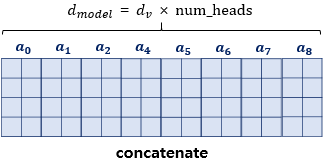
- $d_{model} = d_v$ x num_heads
- 트랜스포머는 입력된 문장 행랼을 num_heads의 수만큼 쪼개서 어텐션을 수행하고 이렇게 얻은 num_heads의 개수만큼의 어텐션 값 행렬을 다시 하나로 concatenate한다.
멀티-헤드 어텐션
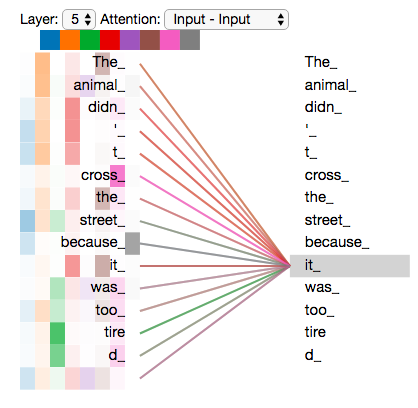
- 위 그림은 num_heads의 값이 8일때, 병렬로 수행되는 어텐션이 서로 다른 셀프 어텐션 결과를 얻을 수 있음을 보여준다.
- 즉, 8개의 머리는 각각 다른 관점에서 어텐션을 수행하므로 한 번의 어텐션만 수행했다면 놓칠 수도 있던 정보를 캐치할 수 있다.
- 에를 들어 위 그림에서 it_이라는 토큰이 animal_과 유사하다고 보는 관점과 street_과 유사하다고 보는 관점이 한꺼번에 모두 표현 간능하다는 것이다.
멀티 헤드 어텐션
- 내부적으로는 스케일드 닷 프로덕트 어텐션 함수를 호출한다.
class MultiHeadAttention(tf.keras.layers.Layer):

  def __init__(self, d_model, num_heads, name="multi_head_attention"):
    super(MultiHeadAttention, self).__init__(name=name)
    self.num_heads = num_heads
    self.d_model = d_model

    assert d_model % self.num_heads == 0

    self.depth = d_model // self.num_heads

    self.query_dense = tf.keras.layers.Dense(units=d_model)
    self.key_dense = tf.keras.layers.Dense(units=d_model)
    self.value_dense = tf.keras.layers.Dense(units=d_model)

    self.dense = tf.keras.layers.Dense(units=d_model)

  def split_heads(self, inputs, batch_size):
    inputs = tf.reshape(
        inputs, shape=(batch_size, -1, self.num_heads, self.depth))
    return tf.transpose(inputs, perm=[0, 2, 1, 3])

  def call(self, inputs):
    query, key, value, mask = inputs['query'], inputs['key'], inputs[
        'value'], inputs['mask']
    batch_size = tf.shape(query)[0]

    # Q, K, V에 각각 Dense를 적용합니다
    query = self.query_dense(query)
    key = self.key_dense(key)
    value = self.value_dense(value)

    # 병렬 연산을 위한 머리를 여러 개 만듭니다
    query = self.split_heads(query, batch_size)
    key = self.split_heads(key, batch_size)
    value = self.split_heads(value, batch_size)

    # 스케일드 닷 프로덕트 어텐션 함수
    scaled_attention = scaled_dot_product_attention(query, key, value, mask)

    scaled_attention = tf.transpose(scaled_attention, perm=[0, 2, 1, 3])

    # 어텐션 연산 후에 각 결과를 다시 연결(concatenate)합니다
    concat_attention = tf.reshape(scaled_attention,
                                  (batch_size, -1, self.d_model))

    # 최종 결과에도 Dense를 한 번 더 적용합니다
    outputs = self.dense(concat_attention)

    return outputs
마스킹
마스킹(Masking)이란?
특정 값들을 가려서 실제 연산에 방해가 되지 않도록 하는 기법이다.
트랜스포머에서는 어텐션을 위해서 크게 두 가지 마스킹을 사용한다.
- 패딩 마스킹(Padding masking)
- 룩 어헤드 마스킹(Look-ahead masking)
패딩 마스킹
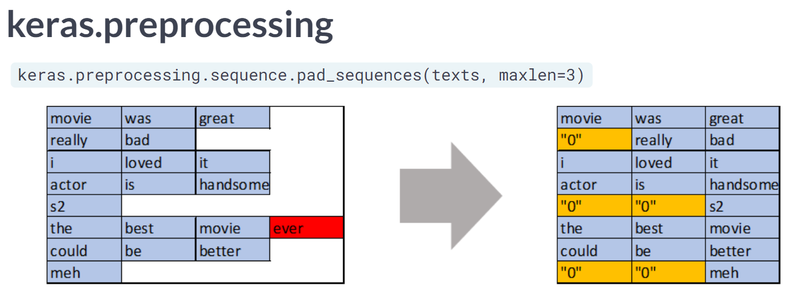
자연어 처리에서 padding이란 문장의 길이가 서로 다를 때, 모든 문장의 길이를 동일하게 해주는 과정에서 정해준 길이보다 짧은 문장의 경우에는 숫자 0을 채워서 문장의 길이를 맞춰주는 자연어 처리 전처리 방법이다.
숫자 0은 실제 의미가 있는 단어가 아니므로 실제 어텐션 등과 같은 연산에서 제외할 필요가 있다. 따라서 패딩 마스킹은 이를 위해 숫자 0인 위치를 체크한다.
padding masking
def create_padding_mask(x):
  mask = tf.cast(tf.math.equal(x, 0), tf.float32)
  # (batch_size, 1, 1, sequence length)
  return mask[:, tf.newaxis, tf.newaxis, :]
print(create_padding_mask(tf.constant([[1, 2, 0, 3, 0], [0, 0, 0, 4, 5]])))
'''
tf.Tensor(
[[[[0. 0. 1. 0. 1.]]]
[[[1. 1. 1. 0. 0.]]]], shape=(2, 1, 1, 5), dtype=float32)
'''- 함수에 정수 시퀀스를 입력으로 하면, 숫자가 0인 부분을 체크한 벡터를 리턴한다.
룩 어헤드 마스킹
RNN과 트랜스포머는 문장을 입력받을 때 입력받는 방법이 전혀 다르다.
- RNN: step이라는 개념이 존재하여 각 step마다 단어가 순서대로 입력으로 들어가는 구조
- 트랜스포머: 문장 행렬을 만들어 한 번에 행렬 형태로 입력으로 들어가는 구조
RNN

- RNN은 구조상으로 다음 단어를 만들어 갈 때, 자신보다 앞에 있는 단어들만 참고해서 다음 단어를 예측한다.
step
- 현재까지의 입력: what → 출력: is
- 현재까지의 입력: what is → 출력: the
- 현재까지의 입력: what is the → 출력: problem
트랜스포머
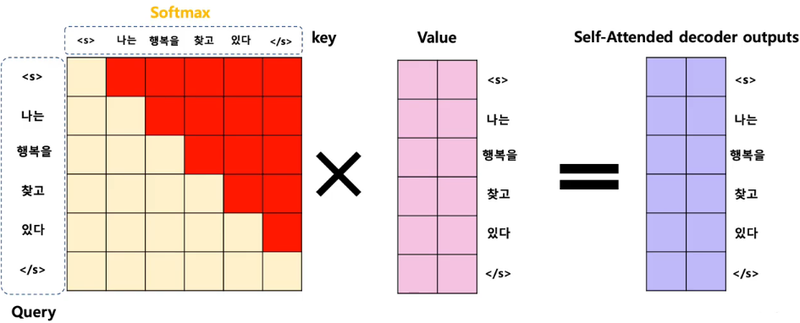
- 트랜스포머는 전체 문장이 문장 행렬로 들어가기 때문에 위치와 상관없이 모든 단어를 참고해서 다음 단어를 예측할 수 있다.
- 하지만 우리가 원하는 것은 이전 단어들로부터 다음단어를 예측하는 훈련을 제대로 하는것이다.
- 따라서 이러한 문제를 해결하기 위해 자신보다 다음에 나올 단어를 참고하지 않도록 가리는 기법이 룩 어헤드 마스킹 기법이다.
위 그림에서 빨간색으로 색칠된 부분은 마스킹을 한 부분이다. 이 빨간색은 실제 어텐션 연산에서 가리는 역할을 하여 어텐션 연산 시에 현재 단어를 기준으로 이전 단어들하고만 유사도를 구할 수 있다.
Look-ahead mask
def create_look_ahead_mask(x):
  seq_len = tf.shape(x)[1]
  look_ahead_mask = 1 - tf.linalg.band_part(tf.ones((seq_len, seq_len)), -1, 0)
  padding_mask = create_padding_mask(x)
  return tf.maximum(look_ahead_mask, padding_mask)
# 0이 없는경우 (패딩 마스킹을 하지 않은 경우)
print(create_look_ahead_mask(tf.constant([[1, 2, 3, 4, 5]])))
'''
tf.Tensor(
[[[[0. 1. 1. 1. 1.]
[0. 0. 1. 1. 1.]
[0. 0. 0. 1. 1.]
[0. 0. 0. 0. 1.]
[0. 0. 0. 0. 0.]]]], shape=(1, 1, 5, 5), dtype=float32)
'''# 0이 있는 경우 (패딩 마스킹을 한 경우)
print(create_look_ahead_mask(tf.constant([[0, 5, 1, 5, 5]])))
'''
tf.Tensor(
[[[[1. 1. 1. 1. 1.]
[1. 0. 1. 1. 1.]
[1. 0. 0. 1. 1.]
[1. 0. 0. 0. 1.]
[1. 0. 0. 0. 0.]]]], shape=(1, 1, 5, 5), dtype=float32)
'''- 대각선의 형태로 숫자 1이 채워진것: 룩 어헤드 마스킹
- 룩 어헤드 마스킹과 패딩 마스킹은 별개이므로 이 마스킹을 수행할 때 만약에 숫자 0인 단어가 있다면 이또한 패딩 해야한다.
인코더
인코더 층 만들기
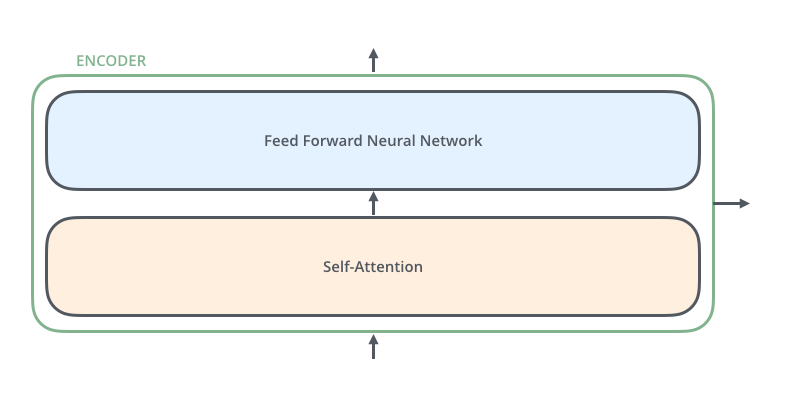
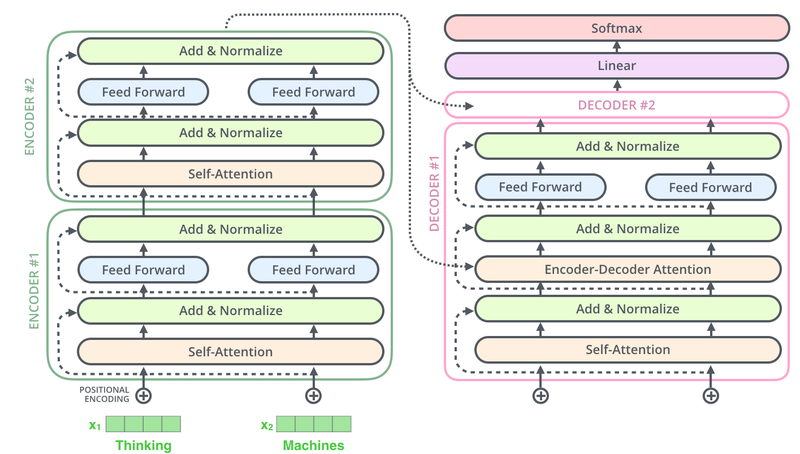
하나의 인코더 층은 2개의 sublayer로 나눠진다.
- Self-Attention
- Feed Forward Neuraol Network
여기서 셀프 어텐션은 멀티 헤드 어텐션을 병렬적으로 이뤄진다.
Encoder
# 인코더 하나의 레이어를 함수로 구현.
# 이 하나의 레이어 안에는 두 개의 서브 레이어가 존재합니다.
def encoder_layer(units, d_model, num_heads, dropout, name="encoder_layer"):
  inputs = tf.keras.Input(shape=(None, d_model), name="inputs")

  # 패딩 마스크 사용
  padding_mask = tf.keras.Input(shape=(1, 1, None), name="padding_mask")

  # 첫 번째 서브 레이어 : 멀티 헤드 어텐션 수행 (셀프 어텐션)
  attention = MultiHeadAttention(
      d_model, num_heads, name="attention")({
          'query': inputs,
          'key': inputs,
          'value': inputs,
          'mask': padding_mask
      })

  # 어텐션의 결과는 Dropout과 Layer Normalization이라는 훈련을 돕는 테크닉을 수행
  attention = tf.keras.layers.Dropout(rate=dropout)(attention)
  attention = tf.keras.layers.LayerNormalization(
      epsilon=1e-6)(inputs + attention)

  # 두 번째 서브 레이어 : 2개의 완전연결층
  outputs = tf.keras.layers.Dense(units=units, activation='relu')(attention)
  outputs = tf.keras.layers.Dense(units=d_model)(outputs)

  # 완전연결층의 결과는 Dropout과 LayerNormalization이라는 훈련을 돕는 테크닉을 수행
  outputs = tf.keras.layers.Dropout(rate=dropout)(outputs)
  outputs = tf.keras.layers.LayerNormalization(
      epsilon=1e-6)(attention + outputs)

  return tf.keras.Model(
      inputs=[inputs, padding_mask], outputs=outputs, name=name)
인코더 층을 쌓아 인코더 만들기
구현한 인코더 층을 임베딩 층(Embedding layer)과 포지셔널 인코딩(Positional Encoding)을 연결하고, 사용자가 원하느 만큼 인코더 층을 쌓음으로써 트랜스포머의 인코더가 완성된다.
인코더와 디코더 내부에서는 각 sublayer이후에 훈련을 돕는 Layer Normalization이라는 테크닉이 사용되었다.
트랜스포먼는 하이퍼파라미터인 num_layers개수의 인코더 층을 쌓는다.
Encoder
def encoder(vocab_size,
            num_layers,
            units,
            d_model,
            num_heads,
            dropout,
            name="encoder"):
  inputs = tf.keras.Input(shape=(None,), name="inputs")

  # 패딩 마스크 사용
  padding_mask = tf.keras.Input(shape=(1, 1, None), name="padding_mask")

  # 임베딩 레이어
  embeddings = tf.keras.layers.Embedding(vocab_size, d_model)(inputs)
  embeddings *= tf.math.sqrt(tf.cast(d_model, tf.float32))

  # 포지셔널 인코딩
  embeddings = PositionalEncoding(vocab_size, d_model)(embeddings)

  outputs = tf.keras.layers.Dropout(rate=dropout)(embeddings)

  # num_layers만큼 쌓아올린 인코더의 층.
  for i in range(num_layers):
    outputs = encoder_layer(
        units=units,
        d_model=d_model,
        num_heads=num_heads,
        dropout=dropout,
        name="encoder_layer_{}".format(i),
    )([outputs, padding_mask])

  return tf.keras.Model(
      inputs=[inputs, padding_mask], outputs=outputs, name=name)
디코더

디코더는 세개의 서브 층으로 구성된다.
- Self-Attention
- Encoder-Decoder Attention
- Feed Forward Neural Network
인코더-디코더 어텐션은 셀프 어텐션과는 달리 Query가 디코더의 벡터인 반면에 Key와 Value가 인코더의 벡터라는 특징을 갖는다.

인코더의 셀프 어텐션과 마찬가지로 디코더의 셀프 어텐션, 인코더-디코더 어텐션 두 개의 어텐션 모두 스케일드 닷 프로덕트 어텐션을 멀티 헤드 어텐션으로 병렬적으로 수행한다.
Decoder layer
# 디코더 하나의 레이어를 함수로 구현.
# 이 하나의 레이어 안에는 세 개의 서브 레이어가 존재합니다.
def decoder_layer(units, d_model, num_heads, dropout, name="decoder_layer"):
  inputs = tf.keras.Input(shape=(None, d_model), name="inputs")
  enc_outputs = tf.keras.Input(shape=(None, d_model), name="encoder_outputs")
  look_ahead_mask = tf.keras.Input(
      shape=(1, None, None), name="look_ahead_mask")
  padding_mask = tf.keras.Input(shape=(1, 1, None), name='padding_mask')

  # 첫 번째 서브 레이어 : 멀티 헤드 어텐션 수행 (셀프 어텐션)
  attention1 = MultiHeadAttention(
      d_model, num_heads, name="attention_1")(inputs={
          'query': inputs,
          'key': inputs,
          'value': inputs,
          'mask': look_ahead_mask
      })

  # 멀티 헤드 어텐션의 결과는 LayerNormalization이라는 훈련을 돕는 테크닉을 수행
  attention1 = tf.keras.layers.LayerNormalization(
      epsilon=1e-6)(attention1 + inputs)

  # 두 번째 서브 레이어 : 마스크드 멀티 헤드 어텐션 수행 (인코더-디코더 어텐션)
  attention2 = MultiHeadAttention(
      d_model, num_heads, name="attention_2")(inputs={
          'query': attention1,
          'key': enc_outputs,
          'value': enc_outputs,
          'mask': padding_mask
      })

  # 마스크드 멀티 헤드 어텐션의 결과는
  # Dropout과 LayerNormalization이라는 훈련을 돕는 테크닉을 수행
  attention2 = tf.keras.layers.Dropout(rate=dropout)(attention2)
  attention2 = tf.keras.layers.LayerNormalization(
      epsilon=1e-6)(attention2 + attention1)

  # 세 번째 서브 레이어 : 2개의 완전연결층
  outputs = tf.keras.layers.Dense(units=units, activation='relu')(attention2)
  outputs = tf.keras.layers.Dense(units=d_model)(outputs)

  # 완전연결층의 결과는 Dropout과 LayerNormalization 수행
  outputs = tf.keras.layers.Dropout(rate=dropout)(outputs)
  outputs = tf.keras.layers.LayerNormalization(
      epsilon=1e-6)(outputs + attention2)

  return tf.keras.Model(
      inputs=[inputs, enc_outputs, look_ahead_mask, padding_mask],
      outputs=outputs,
      name=name)
디코더 층을 쌓아 디코더 만들기
구현한 디코더 층을 임베딩 층(Embedding layer)과 포지셔널 인코딩(Positional Encoding)을 연결하고, 사용자가 원하느 만큼 디코더 층을 쌓음으로써 트랜스포머의 디코더가 완성된다.
트랜스포먼는 하이퍼파라미터인 num_layers개수의 디코더 층을 쌓는다.
Decoder
def decoder(vocab_size,
            num_layers,
            units,
            d_model,
            num_heads,
            dropout,
            name='decoder'):
  inputs = tf.keras.Input(shape=(None,), name='inputs')
  enc_outputs = tf.keras.Input(shape=(None, d_model), name='encoder_outputs')
  look_ahead_mask = tf.keras.Input(
      shape=(1, None, None), name='look_ahead_mask')

  # 패딩 마스크
  padding_mask = tf.keras.Input(shape=(1, 1, None), name='padding_mask')

  # 임베딩 레이어
  embeddings = tf.keras.layers.Embedding(vocab_size, d_model)(inputs)
  embeddings *= tf.math.sqrt(tf.cast(d_model, tf.float32))

  # 포지셔널 인코딩
  embeddings = PositionalEncoding(vocab_size, d_model)(embeddings)

  # Dropout이라는 훈련을 돕는 테크닉을 수행
  outputs = tf.keras.layers.Dropout(rate=dropout)(embeddings)

  for i in range(num_layers):
    outputs = decoder_layer(
        units=units,
        d_model=d_model,
        num_heads=num_heads,
        dropout=dropout,
        name='decoder_layer_{}'.format(i),
    )(inputs=[outputs, enc_outputs, look_ahead_mask, padding_mask])

  return tf.keras.Model(
      inputs=[inputs, enc_outputs, look_ahead_mask, padding_mask],
      outputs=outputs,
      name=name)
챗봇의 병렬 데이터 받아오기
데이터 셋
- dataset: Cornell Movie-Dialogs Corus
데이터 다운로드
path_to_zip = tf.keras.utils.get_file(
    'cornell_movie_dialogs.zip',
    origin='http://www.cs.cornell.edu/~cristian/data/cornell_movie_dialogs_corpus.zip',
    extract=True)

path_to_dataset = os.path.join(
    os.path.dirname(path_to_zip), "cornell movie-dialogs corpus")

path_to_movie_lines = os.path.join(path_to_dataset, 'movie_lines.txt')
path_to_movie_conversations = os.path.join(path_to_dataset,'movie_conversations.txt')
데이터중 5만 개만 가져오기
# 사용할 샘플의 최대 개수
MAX_SAMPLES = 50000
print(MAX_SAMPLES)
데이터 전처리 함수
- 정규 표현식을 사용하여 구두점을 제거하여 단어를 토크나이징하는 일에 방해사 되지 않도록 정제
# 전처리 함수
def preprocess_sentence(sentence):
  sentence = sentence.lower().strip()

  # 단어와 구두점(punctuation) 사이의 거리를 만듭니다.
  # 예를 들어서 "I am a student." => "I am a student ."와 같이
  # student와 온점 사이에 거리를 만듭니다.
  sentence = re.sub(r"([?.!,])", r" \1 ", sentence)
  sentence = re.sub(r'[" "]+', " ", sentence)

  # (a-z, A-Z, ".", "?", "!", ",")를 제외한 모든 문자를 공백인 ' '로 대체합니다.
  sentence = re.sub(r"[^a-zA-Z?.!,]+", " ", sentence)
  sentence = sentence.strip()
  return sentence
데이터 로드 및 전처리
# 질문과 답변의 쌍인 데이터셋을 구성하기 위한 데이터 로드 함수
def load_conversations():
  id2line = {}
  with open(path_to_movie_lines, errors='ignore') as file:
    lines = file.readlines()
  for line in lines:
    parts = line.replace('\n', '').split(' +++$+++ ')
    id2line[parts[0]] = parts[4]

  inputs, outputs = [], []
  with open(path_to_movie_conversations, 'r') as file:
    lines = file.readlines()

  for line in lines:
    parts = line.replace('\n', '').split(' +++$+++ ')
    conversation = [line[1:-1] for line in parts[3][1:-1].split(', ')]

    for i in range(len(conversation) - 1):
      # 전처리 함수를 질문에 해당되는 inputs와 답변에 해당되는 outputs에 적용.
      inputs.append(preprocess_sentence(id2line[conversation[i]]))
      outputs.append(preprocess_sentence(id2line[conversation[i + 1]]))

      if len(inputs) >= MAX_SAMPLES:
        return inputs, outputs
  return inputs, outputs
Sample 확인
# 데이터를 로드하고 전처리하여 질문을 questions, 답변을 answers에 저장합니다.
questions, answers = load_conversations()
print('전체 샘플 수 :', len(questions))
print('전체 샘플 수 :', len(answers))
'''
전체 샘플 수 : 50000
전체 샘플 수 : 50000
'''
print('전처리 후의 22번째 질문 샘플: {}'.format(questions[21]))
print('전처리 후의 22번째 답변 샘플: {}'.format(answers[21]))
'''
전처리 후의 22번째 질문 샘플: she s not a . . .
전처리 후의 22번째 답변 샘플: lesbian ? no . i found a picture of jared leto in one of her drawers , so i m pretty sure she s not harboring same sex tendencies .
'''병렬 데이터 전처리하기
단계
- TensorFlow Datasets SubwordTextEncoder를 토크나이저로 사용한다. 단어보다 더 작은 단위인 Subword를 기준으로 토크나이징하고, 각 토큰을 고유한 정수로 인코딩한다.
- 각 문장을 토큰화하고 각 문장의 시작과 끝을 나타내는
START_TOKEN및END_TOKEN을 추가한다. - 최대 길이 MAX_LENGTH인 40을 넘는 문장들은 필터링한다.
- MAX_LENGTH보다 길이가 짧은 문장들은 40에 맞도록 패딩 한다.
1. 단어장(Vocabulary) 만들기
import tensorflow_datasets as tfds
print("살짝 오래 걸릴 수 있어요. 스트레칭 한 번 해볼까요? 👐")

# 질문과 답변 데이터셋에 대해서 Vocabulary 생성. (Tensorflow 2.3.0 이상) (클라우드는 2.4 입니다)
tokenizer = tfds.deprecated.text.SubwordTextEncoder.build_from_corpus(questions + answers, target_vocab_size=2**13)
# 시작 토큰과 종료 토큰에 고유한 정수를 부여합니다.
START_TOKEN, END_TOKEN = [tokenizer.vocab_size], [tokenizer.vocab_size + 1]시작토큰, 종료토큰 확인
print('START_TOKEN의 번호 :' ,[tokenizer.vocab_size])
print('END_TOKEN의 번호 :' ,[tokenizer.vocab_size + 1])
'''
START_TOKEN의 번호 : [8331]
END_TOKEN의 번호 : [8332]
'''
단어장의 크기 +2 (시작토큰, 종료토큰)
# 시작 토큰과 종료 토큰을 고려하여 +2를 하여 단어장의 크기를 산정합니다.
VOCAB_SIZE = tokenizer.vocab_size + 2
print(VOCAB_SIZE)
'''
8333
'''
2. 각 단어를 고유한 정수로 인코딩(integer encoding) & 패딩(Padding)
- tokenizer.encode(): 각 단어를 정수로 변환
- tokenizer.decode(): 정수 시퀀스를 단어로 변환
padding length
# 샘플의 최대 허용 길이 또는 패딩 후의 최종 길이
MAX_LENGTH = 40
# 정수 인코딩, 최대 길이를 초과하는 샘플 제거, 패딩
def tokenize_and_filter(inputs, outputs):
tokenized_inputs, tokenized_outputs = [], []
for (sentence1, sentence2) in zip(inputs, outputs):
# 정수 인코딩 과정에서 시작 토큰과 종료 토큰을 추가
sentence1 = START_TOKEN + tokenizer.encode(sentence1) + END_TOKEN
sentence2 = START_TOKEN + tokenizer.encode(sentence2) + END_TOKEN
# 최대 길이 40 이하인 경우에만 데이터셋으로 허용
if len(sentence1) <= MAX_LENGTH and len(sentence2) <= MAX_LENGTH:
tokenized_inputs.append(sentence1)
tokenized_outputs.append(sentence2)
# 최대 길이 40으로 모든 데이터셋을 패딩
tokenized_inputs = tf.keras.preprocessing.sequence.pad_sequences(
tokenized_inputs, maxlen=MAX_LENGTH, padding='post')
tokenized_outputs = tf.keras.preprocessing.sequence.pad_sequences(
tokenized_outputs, maxlen=MAX_LENGTH, padding='post')
return tokenized_inputs, tokenized_outputsquestions, answers = tokenize_and_filter(questions, answers)
print('단어장의 크기 :',(VOCAB_SIZE))
print('필터링 후의 질문 샘플 개수: {}'.format(len(questions)))
print('필터링 후의 답변 샘플 개수: {}'.format(len(answers)))3. 교사 강요(Teacher Forcing)사용하기
- tf.data.Dataset API: 훈련 프로세스의 속도가 빨라지도록 입력 파이프라인을 구축한는 API이다.
- 따라서 질문과 답변의 쌍을 tf.data.Dataset에 입력을 넣어준다.
교사강요(Teacher Forcing)이란?
테스트 과정에서 t 시점의 출력이 t+1 시점의 입력으로 사용되는 RNN 모델을 훈련시킬 때 사용하는 훈련 기법이다. 모델이 t 시점에서 예측한 값을 t+1 시점에 입력으로 사용하지 않고, t 시점의 레이블. 즉, 실제 알고있는 정답을 t+1 시점의 입력으로 사용한다.
질문과 답변의 쌍을 tf.data.Dataset API의 입력으로 사용하여 파이프라인을 구성
BATCH_SIZE = 64
BUFFER_SIZE = 20000

# 디코더는 이전의 target을 다음의 input으로 사용합니다.
# 이에 따라 outputs에서는 START_TOKEN을 제거하겠습니다.
dataset = tf.data.Dataset.from_tensor_slices((
    {
        'inputs': questions,
        'dec_inputs': answers[:, :-1]
    },
    {
        'outputs': answers[:, 1:]
    },
))

dataset = dataset.cache()
dataset = dataset.shuffle(BUFFER_SIZE)
dataset = dataset.batch(BATCH_SIZE)
dataset = dataset.prefetch(tf.data.experimental.AUTOTUNE)
모델 정의 및 학습하기
트랜스포머 함수
def transformer(vocab_size,
                num_layers,
                units,
                d_model,
                num_heads,
                dropout,
                name="transformer"):
  inputs = tf.keras.Input(shape=(None,), name="inputs")
  dec_inputs = tf.keras.Input(shape=(None,), name="dec_inputs")

  # 인코더에서 패딩을 위한 마스크
  enc_padding_mask = tf.keras.layers.Lambda(
      create_padding_mask, output_shape=(1, 1, None),
      name='enc_padding_mask')(inputs)

  # 디코더에서 미래의 토큰을 마스크 하기 위해서 사용합니다.
  # 내부적으로 패딩 마스크도 포함되어져 있습니다.
  look_ahead_mask = tf.keras.layers.Lambda(
      create_look_ahead_mask,
      output_shape=(1, None, None),
      name='look_ahead_mask')(dec_inputs)

  # 두 번째 어텐션 블록에서 인코더의 벡터들을 마스킹
  # 디코더에서 패딩을 위한 마스크
  dec_padding_mask = tf.keras.layers.Lambda(
      create_padding_mask, output_shape=(1, 1, None),
      name='dec_padding_mask')(inputs)

  # 인코더
  enc_outputs = encoder(
      vocab_size=vocab_size,
      num_layers=num_layers,
      units=units,
      d_model=d_model,
      num_heads=num_heads,
      dropout=dropout,
  )(inputs=[inputs, enc_padding_mask])

  # 디코더
  dec_outputs = decoder(
      vocab_size=vocab_size,
      num_layers=num_layers,
      units=units,
      d_model=d_model,
      num_heads=num_heads,
      dropout=dropout,
  )(inputs=[dec_inputs, enc_outputs, look_ahead_mask, dec_padding_mask])

  # 완전연결층
  outputs = tf.keras.layers.Dense(units=vocab_size, name="outputs")(dec_outputs)

  return tf.keras.Model(inputs=[inputs, dec_inputs], outputs=outputs, name=name)
print("슝=3")
1. 모델 생성
tf.keras.backend.clear_session()

# 하이퍼파라미터
NUM_LAYERS = 2 # 인코더와 디코더의 층의 개수
D_MODEL = 256 # 인코더와 디코더 내부의 입, 출력의 고정 차원
NUM_HEADS = 8 # 멀티 헤드 어텐션에서의 헤드 수
UNITS = 512 # 피드 포워드 신경망의 은닉층의 크기
DROPOUT = 0.1 # 드롭아웃의 비율

model = transformer(
    vocab_size=VOCAB_SIZE,
    num_layers=NUM_LAYERS,
    units=UNITS,
    d_model=D_MODEL,
    num_heads=NUM_HEADS,
    dropout=DROPOUT)

model.summary()
'''
Model: "transformer"
__________________________________________________________________________________________________
Layer (type)                    Output Shape         Param #     Connected to
==================================================================================================
inputs (InputLayer)             [(None, None)]       0
__________________________________________________________________________________________________
dec_inputs (InputLayer)         [(None, None)]       0
__________________________________________________________________________________________________
enc_padding_mask (Lambda)       (None, 1, 1, None)   0           inputs[0][0]
__________________________________________________________________________________________________
encoder (Functional)            (None, None, 256)    3187456     inputs[0][0]
                                                                 enc_padding_mask[0][0]
__________________________________________________________________________________________________
look_ahead_mask (Lambda)        (None, 1, None, None 0           dec_inputs[0][0]
__________________________________________________________________________________________________
dec_padding_mask (Lambda)       (None, 1, 1, None)   0           inputs[0][0]
__________________________________________________________________________________________________
decoder (Functional)            (None, None, 256)    3714816     dec_inputs[0][0]
                                                                 encoder[0][0]
                                                                 look_ahead_mask[0][0]
                                                                 dec_padding_mask[0][0]
__________________________________________________________________________________________________
outputs (Dense)                 (None, None, 8333)   2141581     decoder[0][0]
==================================================================================================
Total params: 9,043,853
Trainable params: 9,043,853
Non-trainable params: 0
__________________________________________________________________________________________________
'''
2. 손실 함수(Loss function)
- 레이블인 스퀀스에 패딩이 되어 있으므로, loss를 계산할 때 패딩 마스크를 적용해야한다.
def loss_function(y_true, y_pred):
  y_true = tf.reshape(y_true, shape=(-1, MAX_LENGTH - 1))

  loss = tf.keras.losses.SparseCategoricalCrossentropy(
      from_logits=True, reduction='none')(y_true, y_pred)

  mask = tf.cast(tf.not_equal(y_true, 0), tf.float32)
  loss = tf.multiply(loss, mask)

  return tf.reduce_mean(loss)
3. 커스텀 된 학습률(Learning rate)
커스텀 학습률 스케줄링(Custom Learning rate Scheduling)이란?
모델학습 초기에 learning rate를 급격히 높였다가,이후 train step이 진행됨에 따라 서서히 낮추어 가면서 안정적으로 수렴하게 하는 고급 기법

class CustomSchedule(tf.keras.optimizers.schedules.LearningRateSchedule):

  def __init__(self, d_model, warmup_steps=4000):
    super(CustomSchedule, self).__init__()

    self.d_model = d_model
    self.d_model = tf.cast(self.d_model, tf.float32)

    self.warmup_steps = warmup_steps

  def __call__(self, step):
    arg1 = tf.math.rsqrt(step)
    arg2 = step * (self.warmup_steps**-1.5)

    return tf.math.rsqrt(self.d_model) * tf.math.minimum(arg1, arg2)
시각화
sample_learning_rate = CustomSchedule(d_model=128)

plt.plot(sample_learning_rate(tf.range(200000, dtype=tf.float32)))
plt.ylabel("Learning Rate")
plt.xlabel("Train Step")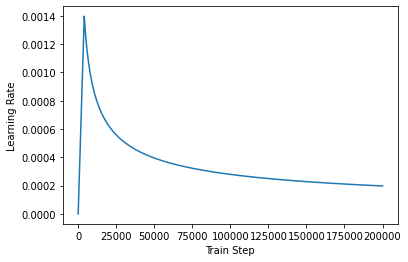
4. 모델 컴파일
learning_rate = CustomSchedule(D_MODEL)

optimizer = tf.keras.optimizers.Adam(
    learning_rate, beta_1=0.9, beta_2=0.98, epsilon=1e-9)

def accuracy(y_true, y_pred):
  y_true = tf.reshape(y_true, shape=(-1, MAX_LENGTH - 1))
  return tf.keras.metrics.sparse_categorical_accuracy(y_true, y_pred)

model.compile(optimizer=optimizer, loss=loss_function, metrics=[accuracy])
5. 훈련하기
EPOCHS = 20
model.fit(dataset, epochs=EPOCHS, verbose=1)
챗봇 테스트하기
예측(inference)단계는 기본적으로 다음과 같은 과정을 거친다.
- 새로운 입력 문장에 대해서는 훈련 때와 동일한 전처리를 거친다.
- 입력 문장을 토크나이징하고,
START_TOKEN과END_TOKEN을 추가한다. - 패딩 마스킹과 룩 어헤드 마스킹을 계산한다.
- 디코더는 입력 시퀀스로부터 다음 단어를 예측한다.
- 디코더는 예측된 다음 단어를 기존의 입력 시퀀스에 추가하여 새로운 입력으로 사용한다.
END_TOKEN이 예측되거나 문장의 최대 길이에 도달하면 디코더는 동작을 멈춘다.
Decoder inference
def decoder_inference(sentence):
  sentence = preprocess_sentence(sentence)

  # 입력된 문장을 정수 인코딩 후, 시작 토큰과 종료 토큰을 앞뒤로 추가.
  # ex) Where have you been? → [[8331   86   30    5 1059    7 8332]]
  sentence = tf.expand_dims(
      START_TOKEN + tokenizer.encode(sentence) + END_TOKEN, axis=0)

  # 디코더의 현재까지의 예측한 출력 시퀀스가 지속적으로 저장되는 변수.
  # 처음에는 예측한 내용이 없음으로 시작 토큰만 별도 저장. ex) 8331
  output_sequence = tf.expand_dims(START_TOKEN, 0)

  # 디코더의 인퍼런스 단계
  for i in range(MAX_LENGTH):
    # 디코더는 최대 MAX_LENGTH의 길이만큼 다음 단어 예측을 반복합니다.
    predictions = model(inputs=[sentence, output_sequence], training=False)
    predictions = predictions[:, -1:, :]

    # 현재 예측한 단어의 정수
    predicted_id = tf.cast(tf.argmax(predictions, axis=-1), tf.int32)

    # 만약 현재 예측한 단어가 종료 토큰이라면 for문을 종료
    if tf.equal(predicted_id, END_TOKEN[0]):
      break

    # 예측한 단어들은 지속적으로 output_sequence에 추가됩니다.
    # 이 output_sequence는 다시 디코더의 입력이 됩니다.
    output_sequence = tf.concat([output_sequence, predicted_id], axis=-1)

  return tf.squeeze(output_sequence, axis=0)
Sentence generation
def sentence_generation(sentence):
  # 입력 문장에 대해서 디코더를 동작 시켜 예측된 정수 시퀀스를 리턴받습니다.
  prediction = decoder_inference(sentence)

  # 정수 시퀀스를 다시 텍스트 시퀀스로 변환합니다.
  predicted_sentence = tokenizer.decode(
      [i for i in prediction if i < tokenizer.vocab_size])

  print('입력 : {}'.format(sentence))
  print('출력 : {}'.format(predicted_sentence))

  return predicted_sentence
test
sentence_generation('Where have you been?')
'''
입력 : Where have you been?
출력 : i m a little tired .
'i m a little tired .'
'''
sentence_generation("It's a trap")
'''
입력 : It's a trap
출력 : i m not leaving you , and i don t want to be the only place to find the real one .
'i m not leaving you , and i don t want to be the only place to find the real one .'
''''AIFFEL > exploration' 카테고리의 다른 글
| Exploration 14 (0) | 2022.02.22 |
|---|---|
| Exploration 13 (0) | 2022.02.17 |
| Exploration 11 (0) | 2022.02.10 |
| Exploration 10 (0) | 2022.02.08 |
| Exploration 09 (0) | 2022.02.03 |