Exploration 15
Exploration 15 문자를 읽을 수 있는 딥러닝
기계가 읽을 수 있나요?

사람이 문자를 읽는 방법
- 문자를 인식
- 인식한 문자를 해독
컴퓨터 비전에서의 용어
- Detection
- Recognition
구글 OCR API
def detect_text(path):
    """Detects text in the file."""
    from google.cloud import vision
    import io
    client = vision.ImageAnnotatorClient()

    with io.open(path, 'rb') as image_file:
        content = image_file.read()

    image = vision.Image(content=content)

    response = client.text_detection(image=image)
    texts = response.text_annotations
    print('Texts:')

    for text in texts:
       print('\n"{}"'.format(text.description))

    vertices = (['({},{})'.format(vertex.x, vertex.y)
                 for vertex in text.bounding_poly.vertices])

    print('bounds: {}'.format(','.join(vertices)))

    if response.error.message:
        raise Exception(
            '{}\nFor more info on error messages, check: '
            'https://cloud.google.com/apis/design/errors'.format(
                response.error.message))
사용한 이미지

# 로컬 환경에서는 다운받은 인증키 경로가 정확하게 지정되어 있어야 합니다.
# 클라우드 환경에서는 무시해도 좋습니다
!ls -l $GOOGLE_APPLICATION_CREDENTIALS

import os
os.environ["GOOGLE_APPLICATION_CREDENTIALS"] =  os.getenv('HOME')+'/aiffel/ocr_python/my_google_api_key.json'

# 입력 이미지 경로를 지정해 주세요.
# (예시) path = os.getenv('HOME')+'/aiffel/ocr_python/test_image.png'
path = os.getenv('HOME')+'/aiffel/ocr_python/images/test.png

# 위에서 정의한 OCR API 이용 함수를 호출해 봅시다.
detect_text(path)
'''
total 4
drwxr-xr-x 31 root root 4096 Feb 24 01:10 aiffel
Texts:

"This is a lot of 12 point text to test the
ocr code and see if it works on all types
of file format.
The quick brown dog jumped over the
lazy fox. The quick brown dog jumped
over the lazy fox. The quick brown dog
jumped over the lazy fox. The quick
brown dog jumped over the lazy fox.
"

"This"

"is"

"a"

"lot"

"of"

"12"

"point"

"text"

"to"

"test"

"the"

"ocr"

"code"

"and"

"see"

"if"

"it"

"works"

"on"

"all"

"types"

"of"

"file"

"format."

"The"

"quick"

"brown"

"dog"

"jumped"

"over"

"the"

"lazy"

"fox."

"The"

"quick"

"brown"

"dog"

"jumped"

"over"

"the"

"lazy"

"fox."

"The"

"quick"

"brown"

"dog"

"jumped"

"over"

"the"

"lazy"

"fox."

"The"

"quick"

"brown"

"dog"

"jumped"

"over"

"the"

"lazy"

"fox."
bounds: (511,330),(560,330),(560,353),(511,353)
'''
어떤 과정으로 읽을까요?

구글 API에서는 문자의 영역을 사각형으로 표현하고 우측에 Block과 paragrapg로 구분해서 인식 결과를 나타내고 있다. 구글 API가 이미지에 박스를 친다음 박스별 텍스트의 내용을 알려준 것
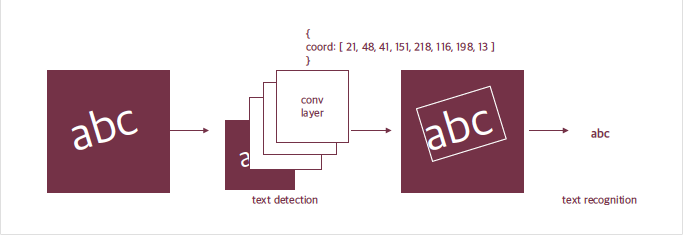
처럼 문자 모델은 보통 두 단계로 이뤄진다.
먼저 입력받은 사진 속에서 문자의 위치를 찾아낸다. 이 과정을 Text Detection(문자검출)이라고 한다. 찾은 문자 영역으로 부터 문자를 읽어내는 것은 Text Recognition(문자인식)이라고 한다.
문자영역을 꼭짓점 좌표를 사용하는 방법 이외의 방법
논문: Scene Text detection with Polygon Offsetting and Border Augmentation
- 축에 정렬된 사각형인 Bounding box 그리고 돌아간 사각형 Oriented bounding box, 자유로운 사각형은 Quadrangle 그리고 다각형인 Polygon, Pixel 수준으로 영역을 표현한 Mask
딥러닝 문자인식의 시작
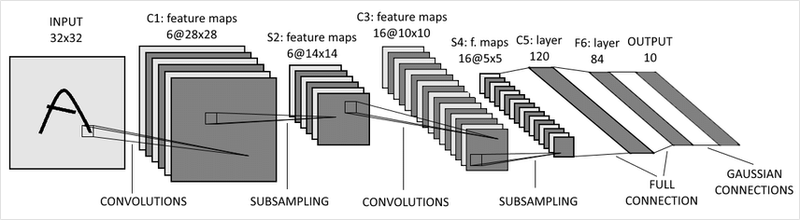
- LeNet은 우편번호나 손글씨를 읽기 위해서 만들어졌다.
하지만 이렇게 단수한 분류 모델만으로는 우리가 위에서 구글 API로 테스트해 보았던 복잡한 결과를 얻을 수 없다. 넓고 복잡한 이미지에서 글자 영역을 찾을 수 없을뿐더러 글자를 영역별로 잘라서 넣더라도 우리가 인식하기를 원하는 사진은 여러 글자가 모여있기 때문에 단순한 분류 문제로 표현이 불가능하다.
강건성(robust)를 확보하는 방법
- 가려진 케이스에 대한 데이터를 확보하거나 Augmentation을 톨해서 해당 케이스에 대한 강건성을 확보한다.
사진 속 문자 찾아내기 - detection

사진 속 문자를 찾아낸는 최근의 딥러닝 모델은 일반적인 Object Detection(객체 인식)방법으로 접근한다. 단지 이미지 속에서 물체를 찾아내는 딥러닝 모델에게 문자를 찾도록 학습을 시킨 것이다.
문자 vs 일반적인 객체
- 일반적인 객체는 물제에 따라서 크기가 일정한 특징을 가진다. 하지만 문자는 영역과 배치가 자유로워 문자를 검출하기 위한 설정이 필요하다.
- 또한 객체는 물체 간 거리가 충분히 확보되는 데에 반해 글자는 매우 촘촘하게 배치되어있다.
사진 속 문자 읽어내기 - recognition
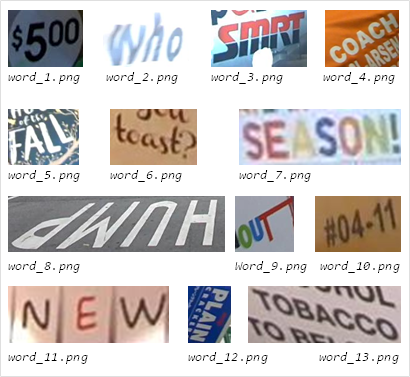
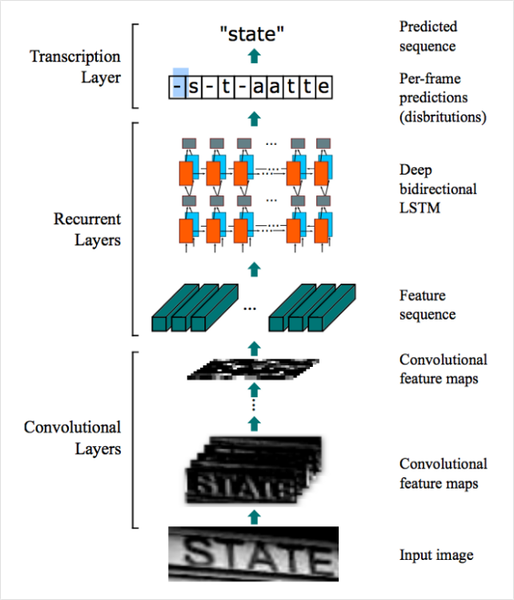
문자 인식은 사진 속에서 문자를 검출해 내는 검출 모델이 영역을 잘라서 주면 그 영역에 어떤 글자가 포함되어 있는지 읽어내는 과정이다.
이 과정은 이미지 문제보다는 자연어 처리에서 많은 영감을 받았다. 이미지 내의 텍스트와 연관된 특징을 CNN을 통해 추출한 후에 스텝 단위의 문자 정보를 RNN으로 인식하는 것이다.
Q6. Detection, Recognition 모델만으로는 단어별 문자를 인식할 수는 있어도 사람이 의미를 가지고 읽어내는 문단("Paragraph") 또는 블록("Block") 정보를 알 수 없을 것 같은데 구글은 이를 어떻게 풀고 있을까요? 자신만의 방법을 상상해 봅시다. 딥러닝을 적용해도 되고 간단한 Rule을 적용한 로직이어도 됩니다.
- 이미지 내에서 검출된 단어 영역의 위치정보를 기준으로 분리해낼 수 있을 것 같습니다.
- X,Y 축으로 L2 Distance가 일정 이내인 단어 또는 문자들의 그룹을 만들어 단락으로 만들어낼 수 있습니다.
keras-ocr 써보기
keras-ocr은 텐서플로우의 케라스 API를 기반으로 이미지 속 문자를 읽는 End-to-End OCR을 할 수 있게 해준다. 검출모델로는 CRAFT(Character Region Awareness for Text Detection)를 사용하고 인식모델로는 CRNN을 사용한다.
import matplotlib.pyplot as plt
import keras_ocr

# keras-ocr이 detector과 recognizer를 위한 모델을 자동으로 다운로드받게 됩니다.
pipeline = keras_ocr.pipeline.Pipeline()- keras_ocr.pipeline.Pipeline(): 인식을 위한 파이프라인을 생성, 이때 초기화 과정에서 미리 학습된 모델의 가중치를 불러온다.
만들어둔 파이프라인의 recogize()에 이미지를 몇 개 넣어주기
# 테스트에 사용할 이미지 url을 모아 봅니다. 추가로 더 모아볼 수도 있습니다.
image_urls = [
  'https://source.unsplash.com/M7mu6jXlcns/640x460',
  'https://source.unsplash.com/6jsp4iHc8hI/640x460',
  'https://source.unsplash.com/98uYQ-KupiE',
  'https://source.unsplash.com/j9JoYpaJH3A',
  'https://source.unsplash.com/eBkEJ9cH5b4'
]

images = [ keras_ocr.tools.read(url) for url in image_urls]
prediction_groups = [pipeline.recognize([url]) for url in image_urls]
인식된 결과를 pyplot으로 시각화
- 내부적으로 recognize()는 검출기와 인식기를 두고
- 검출기로 바운딩 박스를 검출한 뒤
- 인식기가 각 박스로부터 문자를 인식한다.
# Plot the predictions
fig, axs = plt.subplots(nrows=len(images), figsize=(20, 20))
for idx, ax in enumerate(axs):
    keras_ocr.tools.drawAnnotations(image=images[idx],
                                    predictions=prediction_groups[idx][0], ax=ax)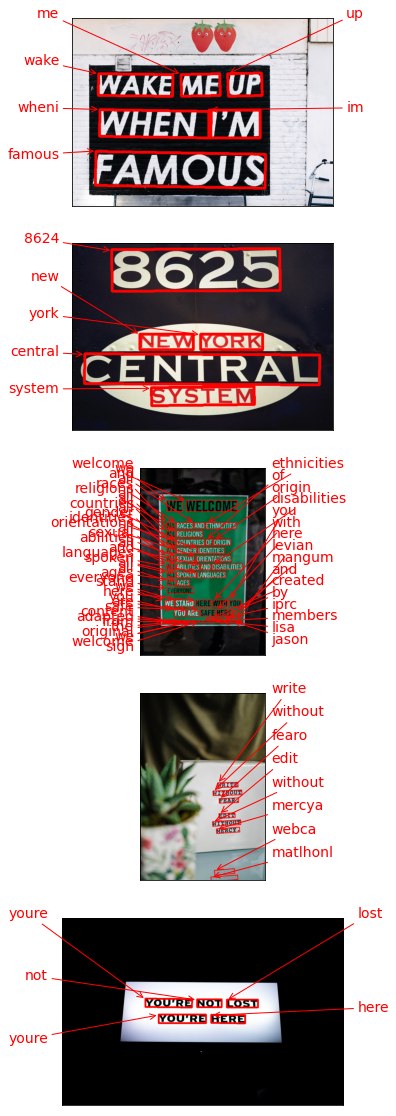
테서랙트 써보기

태서랙트는 구긍에서 후원하는 OCR 오픈소스 라이브러리로 현재는 버전 4와 Tesseract.js등으로 확장되는 등 많은 곳에서 사용되고 있다.
검출
import os
import pytesseract
from PIL import Image
from pytesseract import Output
import matplotlib.pyplot as plt

# OCR Engine modes(–oem):
# 0 - Legacy engine only.
# 1 - Neural nets LSTM engine only.
# 2 - Legacy + LSTM engines.
# 3 - Default, based on what is available.

# Page segmentation modes(–psm):
# 0 - Orientation and script detection (OSD) only.
# 1 - Automatic page segmentation with OSD.
# 2 - Automatic page segmentation, but no OSD, or OCR.
# 3 - Fully automatic page segmentation, but no OSD. (Default)
# 4 - Assume a single column of text of variable sizes.
# 5 - Assume a single uniform block of vertically aligned text.
# 6 - Assume a single uniform block of text.
# 7 - Treat the image as a single text line.
# 8 - Treat the image as a single word.
# 9 - Treat the image as a single word in a circle.
# 10 - Treat the image as a single character.
# 11 - Sparse text. Find as much text as possible in no particular order.
# 12 - Sparse text with OSD.
# 13 - Raw line. Treat the image as a single text line, bypassing hacks that are Tesseract-specific.

def crop_word_regions(image_path='./images/sample.png', output_path='./output'):
    if not os.path.exists(output_path):
        os.mkdir(output_path)
    custom_oem_psm_config = r'--oem 3 --psm 3'
    image = Image.open(image_path)

    recognized_data = pytesseract.image_to_data(
        image, lang='eng',    # 한국어라면 lang='kor'
        config=custom_oem_psm_config,
        output_type=Output.DICT
    )

    top_level = max(recognized_data['level'])
    index = 0
    cropped_image_path_list = []
    for i in range(len(recognized_data['level'])):
        level = recognized_data['level'][i]

        if level == top_level:
            left = recognized_data['left'][i]
            top = recognized_data['top'][i]
            width = recognized_data['width'][i]
            height = recognized_data['height'][i]

            output_img_path = os.path.join(output_path, f"{str(index).zfill(4)}.png")
            print(output_img_path)
            cropped_image = image.crop((
                left,
                top,
                left+width,
                top+height
            ))
            cropped_image.save(output_img_path)
            cropped_image_path_list.append(output_img_path)
            index += 1
    return cropped_image_path_list

work_dir = os.getenv('HOME')+'/aiffel/ocr_python'
img_file_path = work_dir + '/test_image.png'   #테스트용 이미지 경로입니다. 본인이 선택한 파일명으로 바꿔주세요.

cropped_image_path_list = crop_word_regions(img_file_path, work_dir)- crop_word_regions(): 선택한 테스트 이미지를 받아서, 문자 검출을 진행한 후, 검출된 문자 영역을 crop한 이미지로 만들어 그 파일들의 list를 리턴한는 함수
- pytesseract.image_to_data(): pttesseract의 output을 사용해서 결괏값의 형식을 딕셔너리형식으로 설정해준다. 이렇게 인식된결과는 바운딩 박스의 left, top,m width, height 정보를 가지게 되고 바운딩 박스를 사용해 이미지의 문자 영역들을 파이썬 PIL 또는 opencv라이브러리를 사용해 crop하여 cropped_image_path_list에 담아 리턴한다.
인식
def recognize_images(cropped_image_path_list):
    custom_oem_psm_config = r'--oem 3 --psm 7'

    for image_path in cropped_image_path_list:
        image = Image.open(image_path)
        recognized_data = pytesseract.image_to_string(
            image, lang='eng',    # 한국어라면 lang='kor'
            config=custom_oem_psm_config,
            output_type=Output.DICT
        )
        print(recognized_data['text'])
    print("Done")

# 위에서 준비한 문자 영역 파일들을 인식하여 얻어진 텍스트를 출력합니다.
recognize_images(cropped_image_path_list)
'''
This

1S

cy

ot

OT

17

point

1eXxT

TO

Test

the

OCT

code

and

See

IT

if

WOrks

ola

31

types

OT

tiie

format.

The

quick

Drown

dog

Jumped

Over

the

lazy

fOX.

Tne

QUICK

Drown

dog

Jumped

Over

the

lazy

TOX.

The

quick

Drown

dog

jumped

Ove

the

lazy

TOX.

Tne

QUICK

Drown

dog

Jumped

Over

the

lazy

fOX.

Done
''''AIFFEL > exploration' 카테고리의 다른 글
| Exploration 17 (0) | 2022.03.14 |
|---|---|
| Exploration 16 (0) | 2022.03.07 |
| Exploration 14 (0) | 2022.02.22 |
| Exploration 13 (0) | 2022.02.17 |
| Exploration 12 (0) | 2022.02.15 |