
Fundamental 25
2022. 2. 11. 11:56
Regularization과 Normalization
Regularization이란?
- 정칙화하고 불리며, 오버피팅을 해결하기 위한 방법 중의 하나이다.
- L1, L2 Regularization, Dropout, Batch normalization등이 있다.
- 모델이 train set의 정답을 맞히지 모사도록 오버피팅을 방해(train loss가 증가)하는 역할을 한다.
- train loss는 약간 증가하지만 결과적으로, validation loss나 최종적인 test loss를 감소시키려는 목적을 가지고 있다.
Normalization이란?
- 정규화라고 불리며, 이는 데이터의 형태를 좀 더 의미 있게, 혹은 트레이닝에 적합하게 전처리하는 과정이다.
- 데이터를 z-score로 바꾸거나 minmax scaler를 사용하여 0과 1사이의 값으로 분포를 조정하는 것들이 해당된다.
- 모든 피처 값의 범위 분포 특성를 동일하게 하여 모델이 풀어야 하는 문제를 좀 더 간단하게 바꾸어 주는 전처리 과정이다.
Normalization 예시
Iris dateset
from sklearn.datasets import load_iris
import pandas as pd
import matplotlib.pyplot as plt

iris = load_iris()
iris_df = pd.DataFrame(data=iris.data, columns=iris.feature_names)
target_df = pd.DataFrame(data=iris.target, columns=['species'])

# 0, 1, 2로 되어있는 target 데이터를
# 알아보기 쉽게 'setosa', 'versicolor', 'virginica'로 바꿉니다
def converter(species):
    if species == 0:
        return 'setosa'
    elif species == 1:
        return 'versicolor'
    else:
        return 'virginica'

target_df['species'] = target_df['species'].apply(converter)

iris_df = pd.concat([iris_df, target_df], axis=1)
iris_df.head()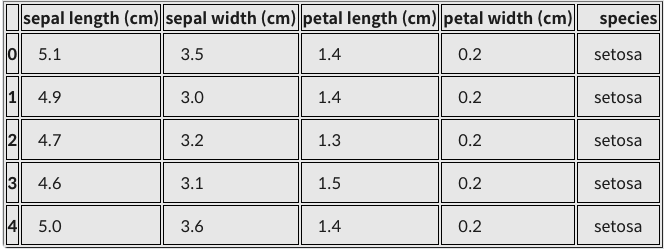
산점도 확인
X = [iris_df['petal length (cm)'][a] for a in iris_df.index if iris_df['species'][a]=='virginica']
Y = [iris_df['sepal length (cm)'][a] for a in iris_df.index if iris_df['species'][a]=='virginica']

print(X)
print(Y)
'''
[6.0, 5.1, 5.9, 5.6, 5.8, 6.6, 4.5, 6.3, 5.8, 6.1, 5.1, 5.3, 5.5, 5.0, 5.1, 5.3, 5.5, 6.7, 6.9, 5.0, 5.7, 4.9, 6.7, 4.9, 5.7, 6.0, 4.8, 4.9, 5.6, 5.8, 6.1, 6.4, 5.6, 5.1, 5.6, 6.1, 5.6, 5.5, 4.8, 5.4, 5.6, 5.1, 5.1, 5.9, 5.7, 5.2, 5.0, 5.2, 5.4, 5.1]
[6.3, 5.8, 7.1, 6.3, 6.5, 7.6, 4.9, 7.3, 6.7, 7.2, 6.5, 6.4, 6.8, 5.7, 5.8, 6.4, 6.5, 7.7, 7.7, 6.0, 6.9, 5.6, 7.7, 6.3, 6.7, 7.2, 6.2, 6.1, 6.4, 7.2, 7.4, 7.9, 6.4, 6.3, 6.1, 7.7, 6.3, 6.4, 6.0, 6.9, 6.7, 6.9, 5.8, 6.8, 6.7, 6.7, 6.3, 6.5, 6.2, 5.9]
'''

plt.figure(figsize=(5,5))
plt.scatter(X,Y)
plt.title('petal-sepal scatter before normalization')
plt.xlabel('petal length (cm)')
plt.ylabel('sepal length (cm)')
plt.grid()
plt.show()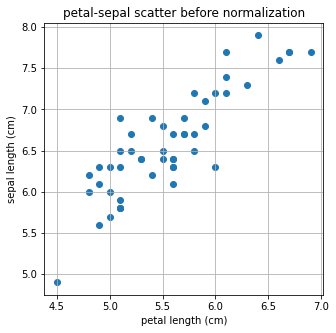
- 아직 nomalization을 하지않아서 최대값과 최솟값의 범위로 그려진다.
minmax_scale 사용
#
from sklearn.preprocessing import minmax_scale

X_scale = minmax_scale(X)
Y_scale = minmax_scale(Y)

plt.figure(figsize=(5,5))
plt.scatter(X_scale,Y_scale)
plt.title('petal-sepal scatter after normalization')
plt.xlabel('petal length (cm)')
plt.ylabel('sepal length (cm)')
plt.grid()
plt.show()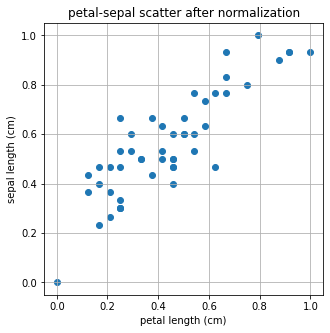
- 분포의 모양은 변하지않고 x,y축의 scale만 변하였다.
Regularization예시
LinearRegression
from sklearn.linear_model import LinearRegression
import numpy as np

X = np.array(X)
Y = np.array(Y)

# Iris Dataset을 Linear Regression으로 학습합니다.
linear= LinearRegression()
linear.fit(X.reshape(-1,1), Y)

# Linear Regression의 기울기와 절편을 확인합니다.
a, b=linear.coef_, linear.intercept_
print("기울기 : %0.2f, 절편 : %0.2f" %(a,b))
'''
기울기 : 1.00, 절편 : 1.06
'''

plt.figure(figsize=(5,5))
plt.scatter(X,Y)
plt.plot(X,linear.predict(X.reshape(-1,1)),'-b')
plt.title('petal-sepal scatter with linear regression')
plt.xlabel('petal length (cm)')
plt.ylabel('sepal length (cm)')
plt.grid()
plt.show()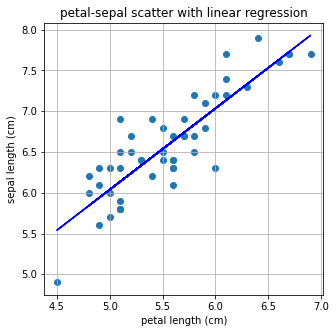
L1 regularization 적용
#
#L1 regularization은 Lasso로 import 합니다.
from sklearn.linear_model import Lasso

L1 = Lasso()
L1.fit(X.reshape(-1,1), Y)
a, b=L1.coef_, L1.intercept_
print("기울기 : %0.2f, 절편 : %0.2f" %(a,b))
'''
기울기 : 0.00, 절편 : 6.59
'''

plt.figure(figsize=(5,5))
plt.scatter(X,Y)
plt.plot(X,L1.predict(X.reshape(-1,1)),'-b')
plt.title('petal-sepal scatter with L1 regularization(Lasso)')
plt.xlabel('petal length (cm)')
plt.ylabel('sepal length (cm)')
plt.grid()
plt.show()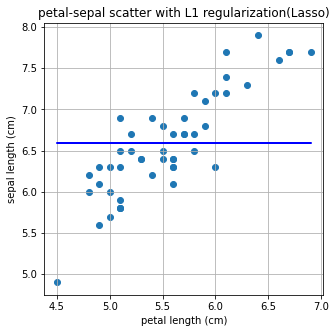
L2 regularization 적용
#L2 regularization은 Ridge로 import 합니다.
from sklearn.linear_model import Ridge

L2 = Ridge()
L2.fit(X.reshape(-1,1), Y)
a, b = L2.coef_, L2.intercept_
print("기울기 : %0.2f, 절편 : %0.2f" %(a,b))
'''
기울기 : 0.93, 절편 : 1.41
'''

plt.figure(figsize=(5,5))
plt.scatter(X,Y)
plt.plot(X,L2.predict(X.reshape(-1,1)),'-b')
plt.title('petal-sepal scatter with L2 regularization(Ridge)')
plt.xlabel('petal length (cm)')
plt.ylabel('sepal length (cm)')
plt.grid()
plt.show()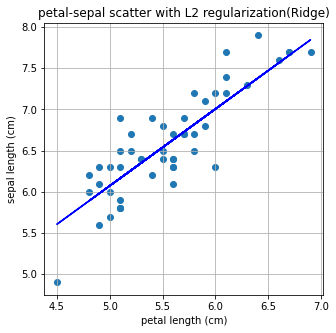
L1 Regularization
L1 regularization (Lasso)의 정의
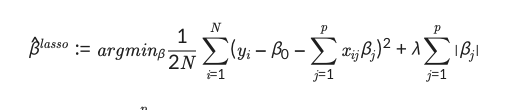
L1은 p=1이므로 다시 정리하면

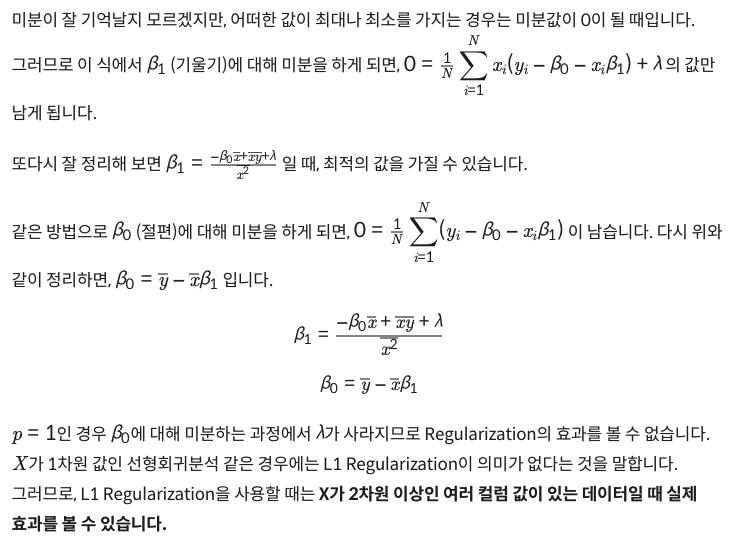
컬럼 수가 많은 데이터에서의 L1 regularization 비교
- wine set 이용
from sklearn.datasets import load_wine

wine = load_wine()
wine_df = pd.DataFrame(data=wine.data, columns=wine.feature_names)
target_df = pd.DataFrame(data=wine.target, columns=['Y'])
Linear regression으로 풀고 계수(coefficient)와 절대 오차(mean absolute error), 제곱 오차(mean squared error), 평균 제곱값 오차(root mean squared error)를 출력
from sklearn.model_selection import train_test_split
from sklearn.linear_model import LinearRegression
from sklearn.metrics import mean_absolute_error, mean_squared_error

# 데이터를 준비하고
X_train, X_test, y_train, y_test = train_test_split(wine_df, target_df, test_size=0.3, random_state=101)

# 모델을 훈련시킵니다.
model = LinearRegression()
model.fit(X_train, y_train)

# 테스트를 해볼까요?
model.predict(X_test)
pred = model.predict(X_test)

# 테스트 결과는 이렇습니다!
print("result of linear regression")
print('Mean Absolute Error:', mean_absolute_error(y_test, pred))
print('Mean Squared Error:', mean_squared_error(y_test, pred))
print('Mean Root Squared Error:', np.sqrt(mean_squared_error(y_test, pred)))

print("\n\n coefficient linear regression")
print(model.coef_)
'''
result of linear regression
Mean Absolute Error: 0.25128973939722626
Mean Squared Error: 0.1062458740952556
Mean Root Squared Error: 0.32595379134971814

 coefficient linear regression
[[-8.09017190e-02  4.34817880e-02 -1.18857931e-01  3.65705449e-02
  -4.68014203e-04  1.41423581e-01 -4.54107854e-01 -5.13172664e-01
   9.69318443e-02  5.34311136e-02 -1.27626604e-01 -2.91381844e-01
  -5.72238959e-04]]
'''
L1 regularization으로 풀기
from sklearn.linear_model import Lasso
from sklearn.metrics import mean_absolute_error, mean_squared_error

# 모델을 준비하고 훈련시킵니다.
L1 = Lasso(alpha=0.05)
L1.fit(X_train, y_train)

# 테스트를 해봅시다.
pred = L1.predict(X_test)

# 모델 성능은 얼마나 좋을까요?
print("result of Lasso")
print('Mean Absolute Error:', mean_absolute_error(y_test, pred))
print('Mean Squared Error:', mean_squared_error(y_test, pred))
print('Mean Root Squared Error:', np.sqrt(mean_squared_error(y_test, pred)))

print("\n\n coefficient of Lasso")
print(L1.coef_)
'''
result of Lasso
Mean Absolute Error: 0.24233731936122138
Mean Squared Error: 0.0955956894578189
Mean Root Squared Error: 0.3091855259513597

 coefficient of Lasso
[-0.          0.01373795 -0.          0.03065716  0.00154719 -0.
 -0.34143614 -0.          0.          0.06755943 -0.         -0.14558153
 -0.00089635]
'''
결과
- Linea regression에서는 모든 컬럼의 가중치를 탐색하여 구하는 반면, L1 Regularization에서는 총 13개 중 7개를 제외한 나머지의 값들이 모두 0임을 확인할 수 있다.
L2 Regularization
L2 Regularization(Ridge)의 정의
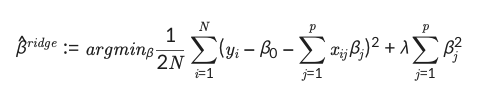
L1, L2 regularization의 차이점

from sklearn.datasets import load_wine
import pandas as pd
import numpy as np
from sklearn.model_selection import train_test_split
from sklearn.metrics import mean_absolute_error, mean_squared_error

wine = load_wine()
wine_df = pd.DataFrame(data=wine.data, columns=wine.feature_names)
target_df = pd.DataFrame(data=wine.target, columns=['Y'])
X_train, X_test, y_train, y_test = train_test_split(wine_df, target_df, test_size= 0.3, random_state=101)
문제
- L1 regularization
- iteration: 5
from sklearn.linear_model import Lasso

L1 = Lasso(alpha=0.05, max_iter=5)
L1.fit(X_train, y_train)
pred = L1.predict(X_test)

print("result of Lasso")
print('Mean Absolute Error:', mean_absolute_error(y_test, pred))
print('Mean Squared Error:', mean_squared_error(y_test, pred))
print('Mean Root Squared Error:', np.sqrt(mean_squared_error(y_test, pred)))

print("\n\n coefficient of Lasso")
print(L1.coef_)
'''
result of Lasso
Mean Absolute Error: 0.24845768841769436
Mean Squared Error: 0.10262989110341268
Mean Root Squared Error: 0.32035900346862844

 coefficient of Lasso
[-0.          0.         -0.          0.03295564  0.00109495  0.
 -0.4027847   0.          0.          0.06023131 -0.         -0.12001119
 -0.00078971]
'''
문제
- L2 regularization
- iteration: 5
from sklearn.linear_model import Ridge

L2 = Ridge(alpha=0.05,max_iter=5)
L2.fit(X_train, y_train)
pred = L2.predict(X_test)

print("result of Ridge")
print('Mean Absolute Error:', mean_absolute_error(y_test, pred))
print('Mean Squared Error:', mean_squared_error(y_test, pred))
print('Mean Root Squared Error:', np.sqrt(mean_squared_error(y_test, pred)))

print("\n\n coefficient of Ridge")
print(L2.coef_)
'''
result of Ridge
Mean Absolute Error: 0.251146695993643
Mean Squared Error: 0.10568076460795564
Mean Root Squared Error: 0.3250857803841251

 coefficient of Ridge
[[-8.12456257e-02  4.35541496e-02 -1.21661565e-01  3.65979773e-02
  -3.94014013e-04  1.39168707e-01 -4.50691113e-01 -4.87216747e-01
   9.54111059e-02  5.37077039e-02 -1.28602933e-01 -2.89832790e-01
  -5.73136185e-04]]
'''
정리
- L1 regularization은 갖우치가 적은 벡터에 해당하는 계수를 0으로 보내면서 차원 축소와 비슷한 역할을 한다.
- L2 regularization은 0이 아닌 0에 가깝게 보내지만 제곱 텀이 있기 때문에 L1 Regularization보다 수렴속도가 빠르다.
- 즉, 제곱 텀에서 결과에 큰 영향을 미치는 값은 더 크게, 결과에 영향이 적은 값들은 더 작게 보내면서 수렴 속도가 빨라진다.
Extra : Lp norm
vector norm
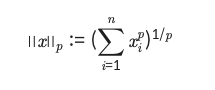
x=np.array([1,10,1,1,1])
p=4
norm_x=np.linalg.norm(x, ord=p)
making_norm = (sum(x**p))**(1/p)
print("result of numpy package norm function : %0.5f "%norm_x)
print("result of making norm : %0.5f "%making_norm)
'''
result of numpy package norm function : 10.00100
result of making norm : 10.00100
'''
matrix norm
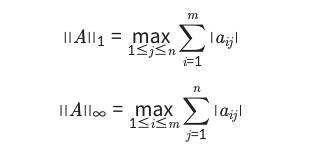
A=np.array([[1,2,3],[1,2,3],[4,6,8]])
inf_norm_A=np.linalg.norm(A, ord=np.inf)
print("result inf norm of A :", inf_norm_A)
one_norm_A=np.linalg.norm(A, ord=1)
print("result one norm of A :", one_norm_A)
'''
result inf norm of A : 18.0
result one norm of A : 14.0
'''
Dropout
- 드롭아웃은 확률적으로 랜덤하게 몇 가지의 뉴럴만 선택하여 정보를 전달하는 과정이다.
- 드롭아웃은 오버피팅을 막는 Reularization layer중 하나이다.
실습
import tensorflow as tf
from tensorflow import keras
import numpy as np
import matplotlib.pyplot as plt
from sklearn.model_selection import train_test_split

fashion_mnist = keras.datasets.fashion_mnist

(train_images, train_labels), (test_images, test_labels) = fashion_mnist.load_data()
class_names = ['T-shirt/top', 'Trouser', 'Pullover', 'Dress', 'Coat',
               'Sandal', 'Shirt', 'Sneaker', 'Bag', 'Ankle boot']

train_images = train_images / 255.0
test_images = test_images / 255.0
dropout: 0.9
model = keras.Sequential([
    keras.layers.Flatten(input_shape=(28, 28)),
    keras.layers.Dense(128, activation='relu'),
    # 여기에 dropout layer를 추가해보았습니다. 나머지 layer는 아래의 실습과 같습니다.
    keras.layers.Dropout(0.9),
    keras.layers.Dense(10, activation='softmax')
])

model.compile(optimizer='adam',loss='sparse_categorical_crossentropy',
              metrics=['accuracy'])

history= model.fit(train_images, train_labels, epochs=5)- accuracy: 0.5761
dropout: X
model = keras.Sequential([
    keras.layers.Flatten(input_shape=(28, 28)),
    # 이번에는 dropout layer가 없습니다.
    keras.layers.Dense(128, activation='relu'),
    keras.layers.Dense(10, activation='softmax')
])

model.compile(optimizer='adam',loss='sparse_categorical_crossentropy',
              metrics=['accuracy'])

history = model.fit(train_images, train_labels, epochs=5)- accuracy: 0.8915
일부러 오버피팅이 나게끔 변경
X_train, X_valid, y_train, y_valid = train_test_split(train_images, train_labels, test_size=0.01, random_state=101)
X_train = X_train / 255.0
X_valid = X_valid / 255.0

#Dense layer만으로 만들어 낸 classification 모델입니다.
model = keras.Sequential([
    keras.layers.Flatten(input_shape=(28, 28)),
    keras.layers.Dense(256, activation='relu'),
    keras.layers.Dense(10, activation='softmax')
])

model.compile(optimizer='adam',loss='sparse_categorical_crossentropy',
              metrics=['accuracy'])

history= model.fit(X_train, y_train, epochs=200, batch_size=512, validation_data=(X_valid, y_valid))
# loss 값을 plot 해보겠습니다.
y_vloss = history.history['val_loss']
y_loss = history.history['loss']
x_len = np.arange(len(y_loss))
plt.plot(x_len, y_vloss, marker='.', c='red', label="Validation-set Loss")
plt.plot(x_len, y_loss, marker='.', c='blue', label="Train-set Loss")
plt.legend(loc='upper right')
plt.grid()
plt.title('Loss graph without dropout layer')
plt.ylim(0,1)
plt.xlabel('epoch')
plt.ylabel('loss')
plt.show()
# accuracy 값을 plot 해보겠습니다.
y_vacc = history.history['val_accuracy']
y_acc = history.history['accuracy']
x_len = np.arange(len(y_acc))

plt.plot(x_len, y_vacc, marker='.', c='red', label="Validation-set accuracy")
plt.plot(x_len, y_acc, marker='.', c='blue', label="Train-set accuracy")
plt.legend(loc='lower right')
plt.grid()
plt.ylim(0.5,1)
plt.title('Accuracy graph without dropout layer')
plt.xlabel('epoch')
plt.ylabel('accuracy')
plt.show()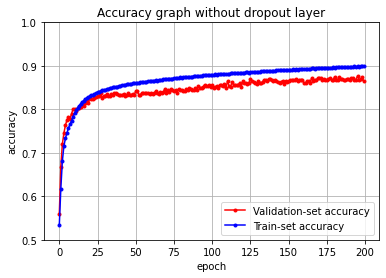
Dropout추가
model = keras.Sequential([
    keras.layers.Flatten(input_shape=(28, 28)),
    keras.layers.Dense(256, activation='relu'),
    # 여기에 dropout layer를 추가해보았습니다. 나머지 layer는 위의 실습과 같습니다.
    keras.layers.Dropout(0.5),
    keras.layers.Dense(10, activation='softmax')
])

model.compile(optimizer='adam',loss='sparse_categorical_crossentropy',
              metrics=['accuracy'])

history= model.fit(X_train, y_train, epochs=200, batch_size=512, validation_data=(X_valid, y_valid))
# loss 값을 plot 해보겠습니다.
y_vloss = history.history['val_loss']
y_loss = history.history['loss']
x_len = np.arange(len(y_loss))
plt.plot(x_len, y_vloss, marker='.', c='red', label="Validation-set Loss")
plt.plot(x_len, y_loss, marker='.', c='blue', label="Train-set Loss")
plt.legend(loc='upper right')
plt.grid()
plt.ylim(0,1)
plt.title('Loss graph with dropout layer')
plt.xlabel('epoch')
plt.ylabel('loss')
plt.show()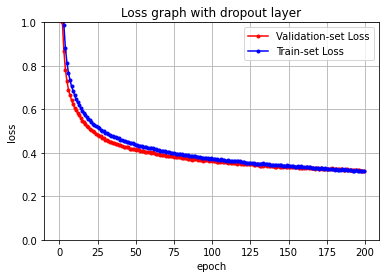
# accuracy 값을 plot 해보겠습니다.
y_vacc = history.history['val_accuracy']
y_acc = history.history['accuracy']
x_len = np.arange(len(y_acc))

plt.plot(x_len, y_vacc, marker='.', c='red', label="Validation-set accuracy")
plt.plot(x_len, y_acc, marker='.', c='blue', label="Train-set accuracy")
plt.legend(loc='lower right')
plt.grid()
plt.ylim(0.5,1)
plt.title('Accuracy graph with dropout layer')
plt.xlabel('epoch')
plt.ylabel('accuracy')
plt.show()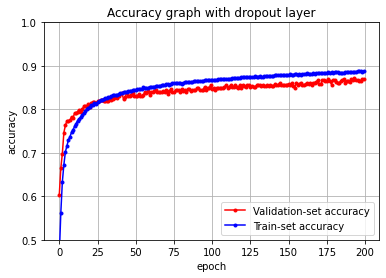
Batch Normalization
Batch Nomalization은 gradient vanishing, explode문제를 해결하는 방법이다.
과정
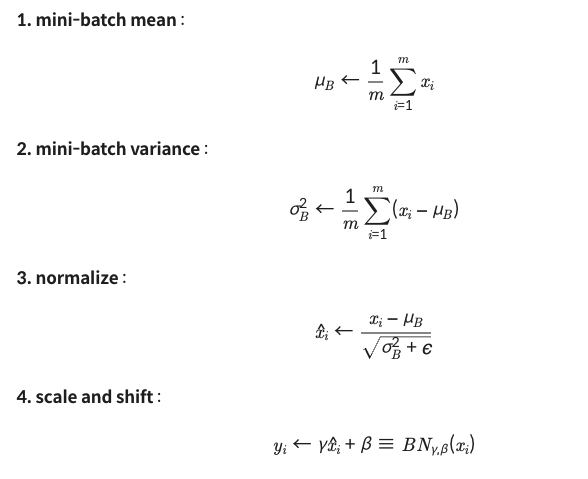
실습
- 정확도 비교
- 속도 차이
batch nomalization X
import tensorflow as tf
from tensorflow import keras
import numpy as np
import matplotlib.pyplot as plt

fashion_mnist = keras.datasets.fashion_mnist

(train_images, train_labels), (test_images, test_labels) = fashion_mnist.load_data()
class_names = ['T-shirt/top', 'Trouser', 'Pullover', 'Dress', 'Coat',
               'Sandal', 'Shirt', 'Sneaker', 'Bag', 'Ankle boot']

train_images = train_images / 255.0
test_images = test_images / 255.0
from sklearn.model_selection import train_test_split
X_train, X_valid, y_train, y_valid = train_test_split(train_images, train_labels, test_size=0.3, random_state=101)
model = keras.Sequential([
keras.layers.Flatten(input_shape=(28, 28)),
keras.layers.Dense(128, activation='relu'),
keras.layers.Dense(10, activation='softmax')
])
model.compile(optimizer='adam',loss='sparse_categorical_crossentropy',
metrics=['accuracy'])
history= model.fit(X_train, y_train, epochs=20, batch_size=2048, validation_data=(X_valid, y_valid))
# - loss: 0.3365 - accuracy: 0.8831 - val_loss: 0.3746 - val_accuracy: 0.8682# loss 값을 plot 해보겠습니다.
y_vloss = history.history['val_loss']
y_loss = history.history['loss']
x_len = np.arange(len(y_loss))
plt.plot(x_len, y_vloss, marker='.', c='red', label="Validation-set Loss")
plt.plot(x_len, y_loss, marker='.', c='blue', label="Train-set Loss")
plt.legend(loc='upper right')
plt.grid()
plt.ylim(0,1)
plt.title('Loss graph without batch normalization')
plt.xlabel('epoch')
plt.ylabel('loss')
plt.show()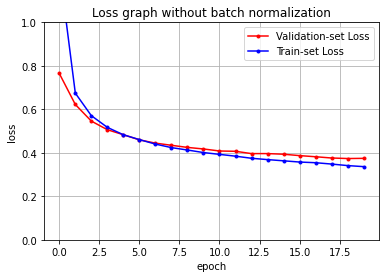
# accuracy 값을 plot 해보겠습니다.
y_vacc = history.history['val_accuracy']
y_acc = history.history['accuracy']
x_len = np.arange(len(y_acc))

plt.plot(x_len, y_vacc, marker='.', c='red', label="Validation-set accuracy")
plt.plot(x_len, y_acc, marker='.', c='blue', label="Train-set accuracy")
plt.legend(loc='lower right')
plt.grid()
plt.ylim(0.5,1)
plt.title('Accuracy graph without batch normalization')
plt.xlabel('epoch')
plt.ylabel('accuracy')
plt.show()
batch nomalization O
model = keras.Sequential([
    keras.layers.Flatten(input_shape=(28, 28)),
    keras.layers.Dense(128, activation='relu'),
    #여기에 batchnormalization layer를 추가해보았습니다. 나머지 layer는 위의 실습과 같습니다.
    keras.layers.BatchNormalization(),
    keras.layers.Dense(10, activation='softmax')
])

model.compile(optimizer='adam',loss='sparse_categorical_crossentropy',
              metrics=['accuracy'])

history= model.fit(X_train, y_train, epochs=20, batch_size=2048, validation_data=(X_valid, y_valid))
# - loss: 0.2209 - accuracy: 0.9219 - val_loss: 0.3477 - val_accuracy: 0.8779
# loss 값을 plot 해보겠습니다.
y_vloss = history.history['val_loss']
y_loss = history.history['loss']
x_len = np.arange(len(y_loss))
plt.plot(x_len, y_vloss, marker='.', c='red', label="Validation-set Loss")
plt.plot(x_len, y_loss, marker='.', c='blue', label="Train-set Loss")
plt.legend(loc='upper right')
plt.grid()
plt.ylim(0,1)
plt.title('Loss graph with batch normalization')
plt.xlabel('epoch')
plt.ylabel('loss')
plt.show()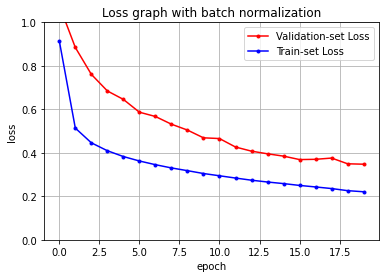
# accuracy 값을 plot 해보겠습니다.
y_vacc = history.history['val_accuracy']
y_acc = history.history['accuracy']
x_len = np.arange(len(y_acc))

plt.plot(x_len, y_vacc, marker='.', c='red', label="Validation-set accuracy")
plt.plot(x_len, y_acc, marker='.', c='blue', label="Train-set accuracy")
plt.legend(loc='lower right')
plt.grid()
plt.ylim(0.5,1)
plt.title('Accurcy graph with batch normalization')
plt.xlabel('epoch')
plt.ylabel('accuracy')
plt.show()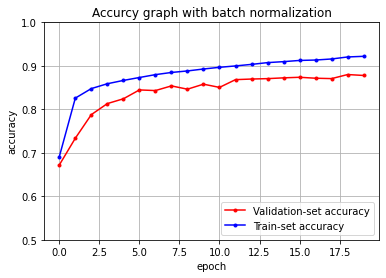
'AIFFEL > fundametal' 카테고리의 다른 글
| Fundamental 27 (0) | 2022.02.16 |
|---|---|
| Fundamental 26 (0) | 2022.02.14 |
| Fundamental 24 (0) | 2022.02.09 |
| Fundamental 23 (0) | 2022.02.07 |
| Fundamental 22 (0) | 2022.02.04 |