
Exploration 04
1. 시퀀스? 스퀀스!I
파이썬에서의 시퀀스 자료형
값이 연속적으로 이어진 자료형들을 총칭하여 ‘시퀀스 자료형(sequence type)’이라고 한다.
인공지능이 예측을 하기위해서는 어느 정도는 연관성이 있어야한다.
2. 다음 am을 쓰면 반 이상은 맞더라
순환신경망(RNN)
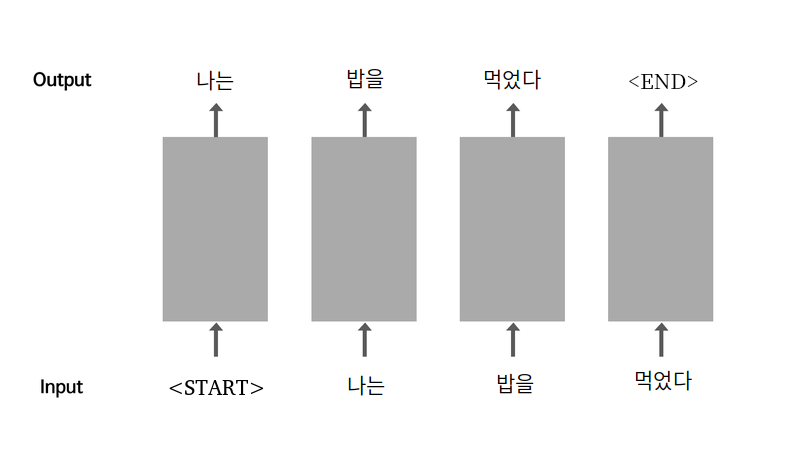
우리는 ‘나는 밥을’이라는 input을 가지고 ‘먹었다’라는 output을 예측할 수 있다. 그러면 ‘나는’ 이라는 output을 내려면 어떻게 할까?
순환신경망에서는 output을 다시 input으로 사용해 이러한 문제를 해결한다. 이러한 순환적 구조에서 시작과 끝은 , 라는 것을 사용해 알아낼 수 있다.
sentence = " 나는 밥을 먹었다 "

source_sentence = "<start>" + sentence
target_sentence = sentence + "<end>"

print("Source 문장:", source_sentence)
print("Target 문장:", target_sentence)
'''
>>>
Source 문장: <start> 나는 밥을 먹었다
Target 문장:  나는 밥을 먹었다 <end>
'''
언어모델 (Language Model)
실습
1. 데이터 전처리
데이터 다운로드
import os, re
import numpy as np
import tensorflow as tf

# 파일을 읽기모드로 열고
# 라인 단위로 끊어서 list 형태로 읽어옵니다.
file_path = os.getenv('HOME') + '/aiffel/lyricist/data/shakespeare.txt'
with open(file_path, "r") as f:
    raw_corpus = f.read().splitlines()

# 앞에서부터 10라인만 화면에 출력해 볼까요?
print(raw_corpus[:9])
데이터는 완벽한 연극 대본이다. 하지만 필요없는 공백정보가 포함되었다.
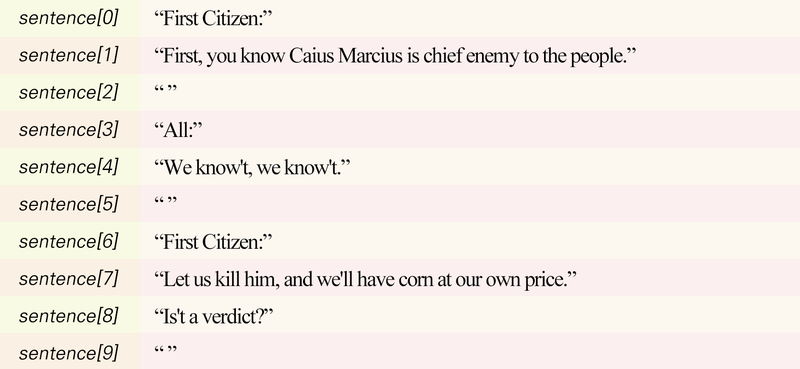
for idx, sentence in enumerate(raw_corpus):
    if len(sentence) == 0: continue   # 길이가 0인 문장은 건너뜁니다.
    if sentence[-1] == ":": continue  # 문장의 끝이 : 인 문장은 건너뜁니다.

    if idx > 9: break   # 일단 문장 10개만 확인해 볼 겁니다.

    print(sentence)
토큰화
이제 문장을 일정한 기준으로 쪼개야 하는 토큰화 작업을 해야한다.
띄어쓰기를 기준으로 할 경우 몇 가지의 문제점이 있다.
- Hi, my name is John. *("Hi," "my", ..., "john." 으로 분리됨) - 문장부호
- First, open the first chapter. *(First와 first를 다른 단어로 인식) - 대소문자
- He is a ten-year-old boy. *(ten-year-old를 한 단어로 인식) - 특수문자
이러한 전처리를 위해 정규표현식(Regex)을 이용한 필터링이 유용하게 사용된다.
# 입력된 문장을
#     1. 소문자로 바꾸고, 양쪽 공백을 지웁니다
#     2. 특수문자 양쪽에 공백을 넣고
#     3. 여러개의 공백은 하나의 공백으로 바꿉니다
#     4. a-zA-Z?.!,¿가 아닌 모든 문자를 하나의 공백으로 바꿉니다
#     5. 다시 양쪽 공백을 지웁니다
#     6. 문장 시작에는 <start>, 끝에는 <end>를 추가합니다
# 이 순서로 처리해주면 문제가 되는 상황을 방지할 수 있겠네요!
def preprocess_sentence(sentence):
    sentence = sentence.lower().strip() # 1
    sentence = re.sub(r"([?.!,¿])", r" \1 ", sentence) # 2
    sentence = re.sub(r'[" "]+', " ", sentence) # 3
    sentence = re.sub(r"[^a-zA-Z?.!,¿]+", " ", sentence) # 4
    sentence = sentence.strip() # 5
    sentence = '<start> ' + sentence + ' <end>' # 6
    return sentence

# 이 문장이 어떻게 필터링되는지 확인해 보세요.
print(preprocess_sentence("This @_is ;;;sample        sentence."))
'''
>>>
<start> this is sample sentence . <end>
'''
이상하고 더러운 문장을 넣어도 깔끔하게 표현된다.
자연어처리 분야에서 모델의 입력이 되는 문장을 소스문장(Source Sentence), 정담 역할을 하하는 출력문장을 타겟 문장(Target Sentence)이라고 한다. 위에서 만든 정제화 함수를 통해 토큰화를 진행한 후 끝 단어 를 없애면 소스문장, 첫 단어 를 없애면 타겟 문장이 된다.
# 여기에 정제된 문장을 모을겁니다
corpus = []

for sentence in raw_corpus:
    # 우리가 원하지 않는 문장은 건너뜁니다
    if len(sentence) == 0: continue
    if sentence[-1] == ":": continue

    # 정제를 하고 담아주세요
    preprocessed_sentence = preprocess_sentence(sentence)
    corpus.append(preprocessed_sentence)

# 정제된 결과를 10개만 확인해보죠
corpus[:10]
'''
>>>
['<start> before we proceed any further , hear me speak . <end>',
 '<start> speak , speak . <end>',
 '<start> you are all resolved rather to die than to famish ? <end>',
 '<start> resolved . resolved . <end>',
 '<start> first , you know caius marcius is chief enemy to the people . <end>',
 '<start> we know t , we know t . <end>',
 '<start> let us kill him , and we ll have corn at our own price . <end>',
 '<start> is t a verdict ? <end>',
 '<start> no more talking on t let it be done away , away ! <end>',
 '<start> one word , good citizens . <end>']
'''
우리가 영어를 한국어로 번역하듯 컴퓨터도 언어가 들어오면 숫자로 번역하는 것이 필요하다.
tf.keras.preprocessing.text.Tokenizer패키지는 정재된 데이터를 토큰화하고, 단어사전을 만들어 주며, 딩터를 숫자로 변환까지 한 번에 해준다. 이과정을 벡터화(vectorize)라 하며, 숫자로 변환된 데이터를 텐서(tensor)라고 한다.
# 토큰화 할 때 텐서플로우의 Tokenizer와 pad_sequences를 사용합니다
# 더 잘 알기 위해 아래 문서들을 참고하면 좋습니다
# https://www.tensorflow.org/api_docs/python/tf/keras/preprocessing/text/Tokenizer
# https://www.tensorflow.org/api_docs/python/tf/keras/preprocessing/sequence/pad_sequences
def tokenize(corpus):
    # 7000단어를 기억할 수 있는 tokenizer를 만들겁니다
    # 우리는 이미 문장을 정제했으니 filters가 필요없어요
    # 7000단어에 포함되지 못한 단어는 '<unk>'로 바꿀거에요
    tokenizer = tf.keras.preprocessing.text.Tokenizer(
        num_words=7000,
        filters=' ',
        oov_token="<unk>"
    )
    # corpus를 이용해 tokenizer 내부의 단어장을 완성합니다
    tokenizer.fit_on_texts(corpus)
    # 준비한 tokenizer를 이용해 corpus를 Tensor로 변환합니다
    tensor = tokenizer.texts_to_sequences(corpus)
    # 입력 데이터의 시퀀스 길이를 일정하게 맞춰줍니다
    # 만약 시퀀스가 짧다면 문장 뒤에 패딩을 붙여 길이를 맞춰줍니다.
    # 문장 앞에 패딩을 붙여 길이를 맞추고 싶다면 padding='pre'를 사용합니다
    tensor = tf.keras.preprocessing.sequence.pad_sequences(tensor, padding='post')

    print(tensor,tokenizer)
    return tensor, tokenizer

tensor, tokenizer = tokenize(corpus)
# 생성된 텐서 데이터를 3번째 행, 10번째 열까지만 출력
print(tensor[:3, :10])
'''
>>>
[[ 2 143 40 933 140 591 4 124 24 110]
[ 2 110 4 110 5 3 0 0 0 0]
[ 2 11 50 43 1201 316 9 201 74 9]]
'''# tokenizer에 구축된 단어 사전 확인
for idx in tokenizer.index_word:
print(idx, ":", tokenizer.index_word[idx])
if idx >= 10: break
'''
>>>
1 : <unk>
2 : <start>
3 : <end>
4 : ,
5 : .
6 : the
7 : and
8 : i
9 : to
10 : of
'''위에 텐서 데이터의 시작이 2인 이류는 tokenizer에 구축된 단어사전 속 의 인덱스가 2이기 때문이다.
소스와 타겟분리
# tensor에서 마지막 토큰을 잘라내서 소스 문장을 생성합니다
# 마지막 토큰은 <end>가 아니라 <pad>일 가능성이 높습니다.
src_input = tensor[:, :-1]
# tensor에서 <start>를 잘라내서 타겟 문장을 생성합니다.
tgt_input = tensor[:, 1:]

print(src_input[0])
print(tgt_input[0])
tf.data.Dataset객체 생성
우리는 지금까지 모델을 만들 때 numpy array형태의 데이터 셋을 사용하였지만 RNN에서는 tf.data.Dataset객체를 많이 사용한다.
BUFFER_SIZE = len(src_input)
BATCH_SIZE = 256
steps_per_epoch = len(src_input) // BATCH_SIZE

 # tokenizer가 구축한 단어사전 내 7000개와, 여기 포함되지 않은 0:<pad>를 포함하여 7001개
VOCAB_SIZE = tokenizer.num_words + 1

# 준비한 데이터 소스로부터 데이터셋을 만듭니다
# 데이터셋에 대해서는 아래 문서를 참고하세요
# 자세히 알아둘수록 도움이 많이 되는 중요한 문서입니다
# https://www.tensorflow.org/api_docs/python/tf/data/Dataset
dataset = tf.data.Dataset.from_tensor_slices((src_input, tgt_input))
dataset = dataset.shuffle(BUFFER_SIZE)
dataset = dataset.batch(BATCH_SIZE, drop_remainder=True)
dataset
'''
>>>
<BatchDataset shapes: ((256, 20), (256, 20)), types: (tf.int32, tf.int32)>
'''
데이터셋 생성과정 정리
- 정규표현식을 이용한 corpus 생성
tf.keras.preprocessing.text.Tokenizer를 이용해 corpus를 텐서로 변환tf.data.Dataset.from_tensor_slices()를 이용해 corpus 텐서를tf.data.Dataset객체로 변환
2. 학습 시키기
만들 모델의 구조

우리가 만들 모델은 tf.keras.Model을 Subclassing하는 방식이다. 위 그림에서 설명한 것처럼 우리가 만들 모델에는 1개의 Embedding 레이어, 2개의 LSTM 레이어, 1개의 Dense 레이어로 구성되어 있다.
모델 생성
class TextGenerator(tf.keras.Model):
    def __init__(self, vocab_size, embedding_size, hidden_size):
        super().__init__()

        self.embedding = tf.keras.layers.Embedding(vocab_size, embedding_size)
        self.rnn_1 = tf.keras.layers.LSTM(hidden_size, return_sequences=True)
        self.rnn_2 = tf.keras.layers.LSTM(hidden_size, return_sequences=True)
        self.linear = tf.keras.layers.Dense(vocab_size)

    def call(self, x):
        out = self.embedding(x)
        out = self.rnn_1(out)
        out = self.rnn_2(out)
        out = self.linear(out)

        return out

embedding_size = 256
hidden_size = 1024
model = TextGenerator(tokenizer.num_words + 1, embedding_size , hidden_size)
Embedding 레이어는 입력 텐서에 들어있는 단어 사전의 인덱스를 실제 워드 벡터로 바꿔주는 역할을 한다.
embedding_size는 워드 벡터의 차원수, 즉 단어가 추상적으로 표현되는 크기이다.
ex).
차갑다: [0.0, 1.0]
뜨겁다: [1.0, 0.0]
미지근하다: [0.5, 0.5]
모델 확인
# 데이터셋에서 데이터 한 배치만 불러오는 방법입니다.
# 지금은 동작 원리에 너무 빠져들지 마세요~
for src_sample, tgt_sample in dataset.take(1): break

# 한 배치만 불러온 데이터를 모델에 넣어봅니다
model(src_sample)
'''
>>>
tf.Tensor: shape=(256, 20, 7001)
'''
shape=(batch size, 자신에게 입력된 시퀀스의 길이만큼 동일한 길이의 시퀀스를 출력 ,Dense layer의 출력 차원수)
model.summary()
'''
>>>
Model: "text_generator_1"
_________________________________________________________________
Layer (type)                 Output Shape              Param #
=================================================================
embedding_1 (Embedding)      multiple                  1792256
_________________________________________________________________
lstm_2 (LSTM)                multiple                  5246976
_________________________________________________________________
lstm_3 (LSTM)                multiple                  8392704
_________________________________________________________________
dense_1 (Dense)              multiple                  7176025
=================================================================
Total params: 22,607,961
Trainable params: 22,607,961
Non-trainable params: 0
_________________________________________________________________
'''
output shape를 알려주지 않는다. 그 이유는 입력 시퀀스의 길이를 모르기 때문이다.
모델 학습
# optimizer와 loss등은 차차 배웁니다
# 혹시 미리 알고 싶다면 아래 문서를 참고하세요
# https://www.tensorflow.org/api_docs/python/tf/keras/optimizers
# https://www.tensorflow.org/api_docs/python/tf/keras/losses
# 양이 상당히 많은 편이니 지금 보는 것은 추천하지 않습니다
optimizer = tf.keras.optimizers.Adam()
loss = tf.keras.losses.SparseCategoricalCrossentropy(
    from_logits=True,
    reduction='none'
)

model.compile(loss=loss, optimizer=optimizer)
model.fit(dataset, epochs=30)
'''
>>>
Epoch 30/30
93/93 [==============================] - 18s 193ms/step - loss: 1.3930
'''
3. 모델 평가
모델이 작문을 잘하는 지 컴퓨터 알고리즘이 평가하는 것은 무리가 있다. 작문 모델을 평가하는 가장 확실한 방법은 작문을 시켜보고 직접 평가 하는 것이다.
def generate_text(model, tokenizer, init_sentence="<start>", max_len=20):
    # 테스트를 위해서 입력받은 init_sentence도 텐서로 변환합니다
    test_input = tokenizer.texts_to_sequences([init_sentence])
    test_tensor = tf.convert_to_tensor(test_input, dtype=tf.int64)
    end_token = tokenizer.word_index["<end>"]

    # 단어 하나씩 예측해 문장을 만듭니다
    #    1. 입력받은 문장의 텐서를 입력합니다
    #    2. 예측된 값 중 가장 높은 확률인 word index를 뽑아냅니다
    #    3. 2에서 예측된 word index를 문장 뒤에 붙입니다
    #    4. 모델이 <end>를 예측했거나, max_len에 도달했다면 문장 생성을 마칩니다
    while True:
        # 1
        predict = model(test_tensor)
        # 2
        predict_word = tf.argmax(tf.nn.softmax(predict, axis=-1), axis=-1)[:, -1]
        # 3
        test_tensor = tf.concat([test_tensor, tf.expand_dims(predict_word, axis=0)], axis=-1)
        # 4
        if predict_word.numpy()[0] == end_token: break
        if test_tensor.shape[1] >= max_len: break

    generated = ""
    # tokenizer를 이용해 word index를 단어로 하나씩 변환합니다
    for word_index in test_tensor[0].numpy():
        generated += tokenizer.index_word[word_index] + " "

    return generated
generate_text(model, tokenizer, init_sentence="<start> he")
'''
>>>
'<start> he s not fourteen . <end> '
''''AIFFEL > exploration' 카테고리의 다른 글
| Exploration 06 (0) | 2022.01.20 |
|---|---|
| Exploration 05 (0) | 2022.01.18 |
| Exploration 03 (0) | 2022.01.11 |
| Exploration 02 (0) | 2022.01.06 |
| Exploration 01 (0) | 2022.01.04 |